How to Cancel Fortnite Crew Subscription: Complete Guide
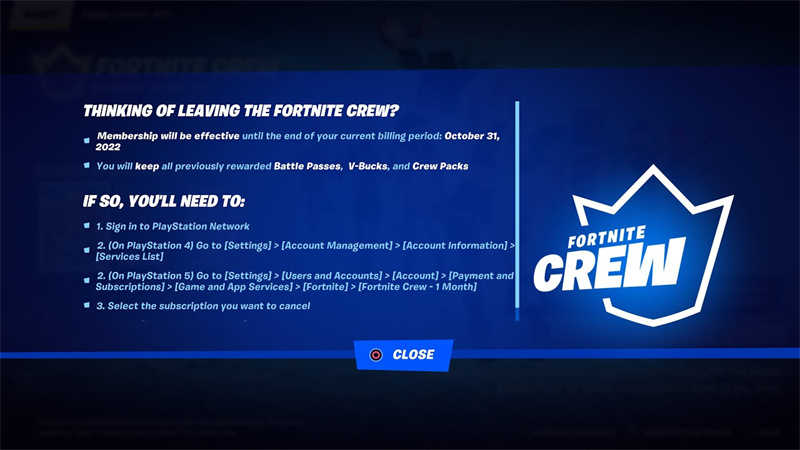
Fortnite Crew is a hot topic in the popular Fortnite game community. It offers some exciting rewards to keep players invested in the game. Still, some gamers decide to cancel Fortnite Crew as it is frustrating for gamers to invest a certain amount every month, and their rewards are not impressive anymore. Now the question is, how can I cancel a Fortnite subscription, or is it possible to cancel it?
Epic Games, the mind and hands behind Fortnite has made it easy for gamers to cancel the Fortnite crew subscription on the go. With the right steps, you can easily do it in a few clicks. If you are missing the right steps to get the cancelation work done, keep reading. Here, we will uncover all the steps and walk you through easy steps on how to cancel the Fortnite crew.
Part 1: Is Fortnite Crew Worth It?
This Fortnite Crew bundle includes an exclusive skin and accompanying accessory, opening possibilities. As a Fortnite Crew member, you get full Battle Pass access. Subscribing to the service ensures you get each battle pass as soon as it's released. Grinds and Fortnite rewards are still involved, but it's still a worthwhile choice.
With every monthly subscription, users also receive 1,000 V-Bucks. The items you can purchase in the Item Shop can be used to buy outfits, emotes, and more.
Part 2: How Much is a Fortnite Crew Subscription?
The Fortnite Crew subscription service is a unique way to improve the Fortnite experience by providing enhanced features at a low cost of $11.99 per month. There are several benefits subscribers can take advantage of, including:
- New Crew Pack Every Month
- Passes for Fortnite Battle Royale
- 1,000 Bonus V-Bucks Every Month
- Premium Rocket League Pass (Includes Bonus Benefits)
Best Game Streaming Webcam for Fortnite: OBSBOT Meet 2 4K Webcam
The OBSBOT Meet 2 is an advanced technology webcam designed to revolutionize Fortnite recording and streaming. This is among the leading 4K webcam in the market offering gamers next-level video quality to compete with anything on the market.
Key Features
- Budget-friendly device in UHD 4K clarity.
- AI auto frame keeps you in the center even in a group shoot.
- Dual omnidirectional reduction microphones for clear sound capture.
- Versatile shooting modes for your preferred style.
- Faster and more precise focusing with PDAF.
Part 3: How to Cancel Fortnite Crew?
It has now been a while since you purchased Fortnite Crew subscriptions at a reasonable monthly price, and you are enjoying its benefits. Here are easy steps on how to cancel a Fortnite subscription:
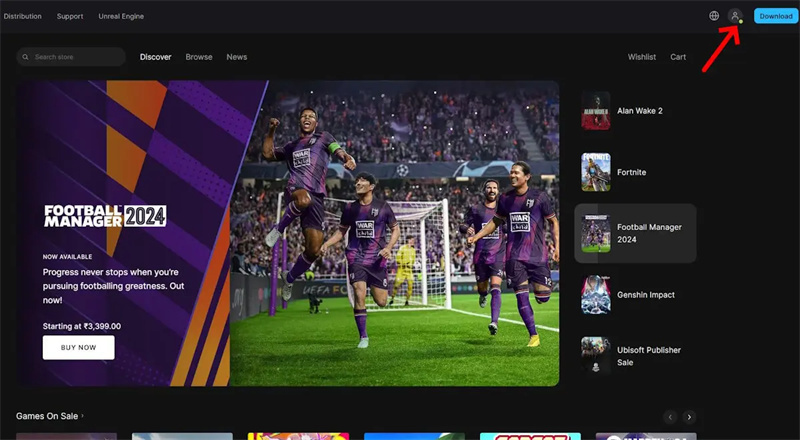
Step 1: Go to the Epic Games account page. Be sure you are logged into your Epic Games Fortnite account.
Step 2: At the top-right of your profile, click on your picture and click on Settings.
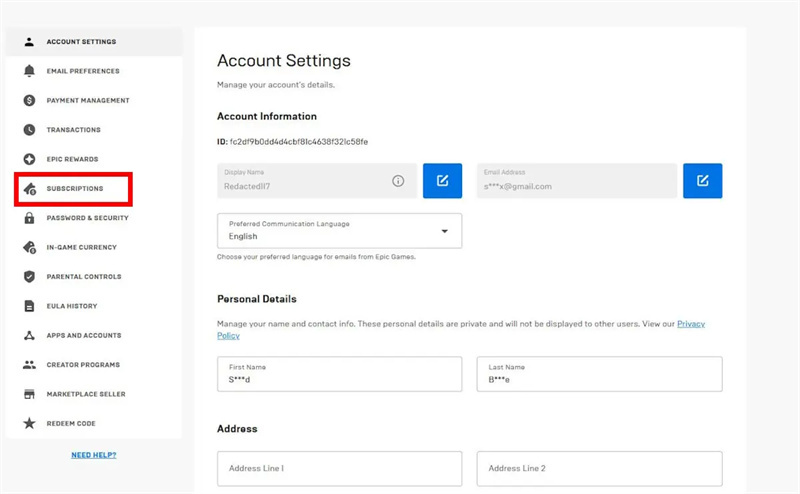
Step 3: Go to the account settings page and select Subscriptions.
Step 4: The Fortnite Crew Subscription can be accessed by clicking the cog wheel icon on the subscription page. Select the cancel option.
If you follow the above steps, your Crew subscription will immediately be canceled, and your credit card will not be charged automatically.
Part 4: How do I Refund Fortnite Crew on Fortnite?
Fornite cares for its customers and makes sure gamers are put into a win-win situation. Hence, they offer a refund for Fornite Crew. Here are a few easy steps to get a refund:
Step 1: Get your device and go to Fortnite. Begin with signing in.
Step 2: Now, hit "Settings," which you can find in the main menu.
Step 3: Click on the "Subscription Management" option.
Step 4: Next up, go to the "Cancel" button next to your active Fortnite Crew subscription.
Step 5: Lastly, you can confirm the cancellation and refund request. Once you've done so, your refund will be initiated shortly.
FAQs About Cancel Fortnite Crew Subscription
1. How do I unsubscribe from Fortnite Crew?
First of all, you’ve to turn off auto-renewal. You have to go to epicgames.com, open the account, go to subscriptions, and then Fortnite Crew. Then, just press the cancel subscription button. In case you are using a gaming console, go to the subscription settings and choose the “turn off auto-renew” option.
2. Can I cancel Fortnite Crew and get my money back?
No, it is not possible to get a refund after canceling the Fortnite Crew subscription. This is because Epic Games doesn’t offer refunds. This means you will keep access to your account until the end of the billing cycle. However, you won’t get the money back for unused time.
3. Do I lose everything if I cancel Fortnite Crew?
No, you don’t lose previously earned rewards such as Battle Pass content, V-Bucks, and Crew Packs you already received. Canceling stops future benefits and monthly rewards, but items earned while subscribed remain on your account.
4. Where can I find my Fortnite Crew subscription?
You can find your Fortnite Crew subscription in your platform’s subscription settings or within Fortnite itself. On Epic Games, go to epicgames.com/account and then Subscriptions if you are using PlayStation, Xbox, or Nintendo Switch. Your subscription status and renewal dates are shown there.
5. How do I cancel a payment on Fortnite?
To stop future payments, cancel Fortnite Crew’s auto-renewal through your platform’s subscription management. This prevents billing for the next cycle but doesn’t refund past charges. Check your Epic Games, PlayStation, Xbox, or Nintendo account settings to turn off recurring billing.
6. How to stop Fortnite Crew from recurring?
Stopping Fortnite Crew from recurring means disabling auto-renewal in your subscriptions. Find Fortnite Crew in your account settings (Epic Games, PlayStation Network, Xbox, or Nintendo) and select the option to Turn Off Auto-Renew or Turn Off Recurring Billing. This ends future charges after the current period.
7. How to manage your Fortnite Crew subscription?
You manage your Fortnite Crew subscription in your platform’s subscription dashboard or via the Fortnite in-game settings. On Epic Games, go to epicgames.com/account and then Subscriptions. If you are using consoles, use each platform’s subscription menu to view status, turn off auto-renewal, or check expiration dates.
Conclusion
There is no longer a frustrating method to cancel the Fortnite crew subscription pack. With a few easy steps, you can easily tackle the debate of how to cancel the crew pack subscription. Fortnite has made several things easier for gamers and allows easy refunds after canceling a Subscription.
If you have faced challenges while streaming Fortnite, like camera quality, bad night vision camera performance, or unclear audio, OBSBOT Meet 2 is your ultimate solution. It is a high-performance webcam that makes it easier for gamers to streamline Fortnite gameplay.