6 Best Cameras to Record Volleyball Games in 2026

Recording a volleyball game is harder than pointing a camera at the net. The ball moves quickly, players spread across the court, and gym lighting can make distant action difficult to see. The best camera to record volleyball games depends on what you need from the footage: a complete match for coaching, a stream for families, or close-ups and highlights of individual players.
This guide compares six volleyball camera options at different prices. It also explains when a phone may be enough, what additional equipment each setup needs, and which cameras work best with or without an operator.
Part 1: What to Consider When Choosing a Volleyball Camera
Start with the footage you want to take home. Coaches usually need to see all six players and the full rally. Parents may want a dependable recording of the entire match. A creator making player highlights needs closer framing, stronger indoor image quality, and someone to operate the camera.
- Court coverage: For match review, position the camera high enough to see both sides of the court and keep the far corners in frame.
- Video quality: 4K gives you room to crop a wide recording when editing. Check a short test clip first: if players on the far side are too small to identify, resolution alone will not fix the camera position.
- Zoom Features: Zoom is ever so important when working across the court or the stands. With a volleyball camera with a zoom feature, you can follow players on critical shots like serves or blocks and catch dramatic close-ups without any loss in quality, similar to using a baseball camera or video camera for football.
- Stability: Shaky video footage could be uneasy to watch and evaluate. For even handheld shooting, ensure the camera has built-in stabilization or gimbal functions to help keep shots clear and fluid, just like professional setups for tennis cameras or golf cameras.
- Frame rate: 60 fps makes fast play look smoother and gives editors more flexibility for slow-motion clips. Bright enough gym lighting and an appropriate shutter speed also matter when trying to keep the ball and players sharp.
- Indoor lighting: Dim or uneven gym lighting can make distant players noisy and blur quick movement. A larger sensor and a bright lens help most when you want usable close-ups rather than a basic record of the match.
- Battery and storage: Count the full tournament day, not just one match. Bring external power or spare batteries, sufficient recording space, and time to check both between sets.
Part 2: The Best Volleyball Cameras Comparison
| Camera | Video Quality | Zoom | Stabilization | Frame Rate | Indoor-Light Consideration | Battery Life | Best Use Case | Price |
| DJI Osmo Action 4 | 4K @60fps | Fixed wide-angle lens | Electronic stabilization | Up to 120fps in 4K | 1/1.3-inch sensor; distant players can look small or noisy in dim gyms | Up to 150 minutes at 1080p/24fps in lab conditions | Affordable fixed wide game recording | $239 |
| XbotGo Chameleon + phone | Up to 4K with a compatible phone and mode | Depends on phone and app framing | Motorized pan/tilt phone mount | Depends on phone and recording mode | Depends on phone camera and gym lighting | Mount up to 8 hours; phone battery separate | Phone-based automatic tracking and streaming | $299.99 |
| OBSBOT Tail 2 | 4K @60fps | 5x Optical, 12x Hybrid | 3-axis gimbal | 60fps/120fps | Large 2μm pixel sensor + Dual Native ISO integrated | Up to 3 hours 40 minutes | Multi-camera production, solo training | $1199 |
| Canon EOS R8 | 4K @60fps | Lens-based | Digital IS | 60fps | Full-frame, clean up to ISO 12800 | About 120 minutes | Versatile coaching & content | $1499 |
| Sony FX30 | 4K @120fps | Lens-based | 5-axis in-body stabilization | 120fps | Dual ISO, clean up to ISO 6400 | About 100 minutes | Pro-level game recording | $1799 |
| Panasonic Lumix GH6 | 5.7K @60fps | Lens-based | 5-axis IBIS | 120fps | Best performance under ISO 1600 | About 35 minutes | Highlight reels, training | $2197 |
For Parents and Coaches: How to Record the Full Match
You can also record the volleyball games with your phone. It is the easiest, cheapest option and often good enough. First try it on a stable, elevated stand. Record horizontally and frame the whole court, including the far corners, before the first serve. Film a short test rally from the position you will actually use: check whether the ball stays in view, players' numbers are readable enough, and passers-by block the shot. Keep local recording on even if you also livestream, and bring power and enough free storage for every match that day. This setup can record unattended once it is framed; someone still needs to start each recording and check it between sets.
Part 3: 6 Best Cameras for Recording Volleyball
The cameras below serve different jobs. Start with the least expensive setup that produces the footage you need, then consider tracking, optical zoom, or interchangeable lenses if the way you film calls for them.
1. DJI Osmo Action 4
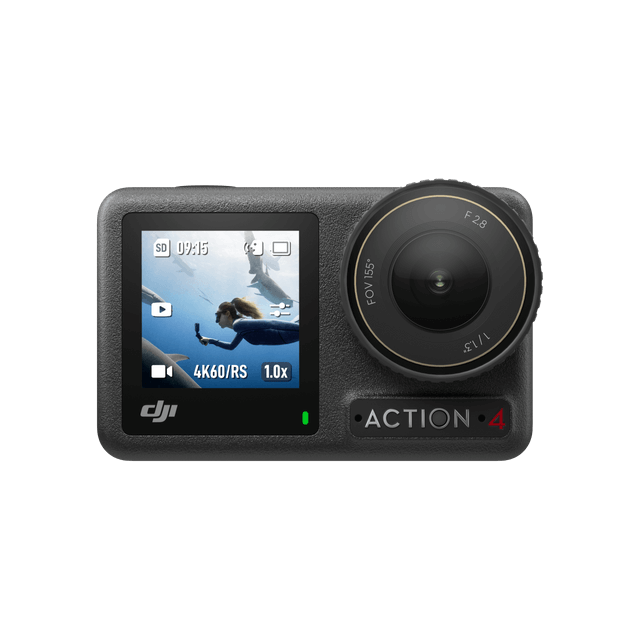
The DJI Osmo Action 4 is the lowest-priced standalone camera in this comparison. It records 4K at 60 fps and can capture 4K at up to 120 fps for slow-motion clips. Its fixed wide lens makes sense when the goal is to leave one camera in place and record a complete court.
Mount it high enough that spectators do not block the view, then check a test rally before the match. Its 1/1.3-inch sensor helps with indoor recording, although a dim court still limits the detail you can recover from a distant wide shot.
In practice, a high, fixed mount keeps the whole rally visible; this camera handles well for recording the whole games.
Key features:
- 4K/60 fps recording for full-match footage and up to 4K/120 fps for short slow-motion clips.
- Fixed wide-angle lens that can keep the court in view without a camera operator.
- Electronic stabilization for handheld practice clips and sideline footage.
Best for: Parents or coaches who want an affordable, separate camera for an elevated, fixed view of the game.
Before you buy: Add a stable tall mount, a microSD card, and external power or spare batteries for a long tournament day. The useful tips is to use a power bank and fan during multi-hour recording, whis is a practical choice for continuous filming.
2. XbotGo Chameleon + Smartphone
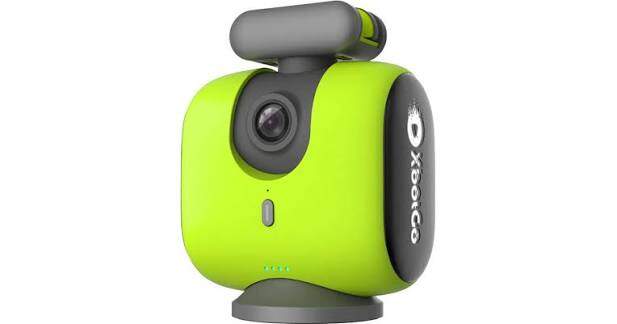
XbotGo Chameleon is a motorized mount rather than a standalone camera. Attach a compatible iPhone or Android phone, and the XbotGo App moves the phone to follow play. At $299.99 for the mount, it can be a relatively accessible way to add tracking when you already have a suitable phone available.
Video resolution, frame rate, and low-light performance come from the phone and the recording mode you use. The mount is rated for up to eight hours. Place the setup on a sturdy elevated tripod so the tracking view stays clear of spectators.
In practice, its moving view makes streams more engaging, while a fixed wide shot better preserves off-ball movement for review.
Key features:
- Motorized pan and tilt that moves a compatible phone to follow the game.
- Phone-based recording and streaming, with up to 4K available on compatible devices and modes.
- Core tracking, recording, and streaming features without a subscription; 20 GB of cloud storage is included.
Best for: A parent or team that already owns a compatible spare phone and wants a more active game stream with limited camera operation.
3. OBSBOT Tail 2
The OBSBOT Tail 2 records 4K at 60 fps or 1080p at 120 fps with a 1/1.5-inch sensor. Its 5x optical zoom, 12x hybrid zoom, and three-axis gimbal give a coach or creator more framing options from one mounted position. Optical zoom is especially useful when recording an individual player from farther back in the gym.
AI tracking makes Tail 2 useful for player-focused training shots and a moving live view. When the recording will be used to review rotations or team positioning, set a wider frame that keeps all six players visible. The camera can run for up to 3 hours and 40 minutes of continuous shooting, covering many individual matches without a battery change.
Key features:
- 4K/60 fps and 1080p/120 fps recording for game footage and slow-motion review.
- 5x optical zoom, 12x hybrid zoom, and a three-axis gimbal for flexible framing.
- AI tracking and connections suited to a more involved live production setup.
Best for: Coaches, solo creators, and teams that need tracking or optical zoom.
Before you buy: Choose Tail 2 when changing the shot remotely or following a player is more valuable to you than recording one permanently fixed, court-wide view. For more ways to cover a match, see OBSBOT's sports production setups.
4. Canon EOS R8

The Canon EOS R8 combines a 24.2 MP full-frame sensor with uncropped 4K/60 fps video oversampled from 6K. Dual Pixel CMOS AF II helps when switching between video of a rally and still photos of individual players. Its larger sensor is useful in gyms where a smaller camera leaves faces and uniforms looking noisy.
The lens determines what you can actually capture. A bright lens helps keep a player visible during fast action in a dim gym; a wide enough lens is needed if the camera is close to the court and must show the whole match. The R8 uses digital video stabilization, so a tripod is particularly useful for a long recording.
Key features:
- 24.2 MP full-frame sensor for a camera that handles both player photos and video.
- Uncropped 4K/60 fps video oversampled from 6K.
- Dual Pixel CMOS AF II for keeping moving players in focus.
Best for: A parent, coach, or creator who wants one camera for indoor volleyball photography and operated match video.
Before you buy: The body price does not include the lens. Choose the lens for your actual seat or camera position, then add a tripod, recording card, and spare power. This setup makes the most sense if someone can frame the action and you will use its photo capabilities as well.
5. Sony FX30

The Sony FX30 is a Super 35 cinema camera that records up to 4K/120 fps. Its real-time Eye AF and subject tracking help an operator follow moving players, while five-axis in-body stabilization helps with handheld sideline footage. Slow motion, color controls, and the optional XLR handle give a video team more room to build polished match highlights.
Think about the shot before choosing a lens. A lens wide enough for your court position is useful for general match footage; a suitable zoom lets an operator move between the server, the net, and player reactions. A tight highlight shot requires attention throughout the rally, so the FX30 is a better fit for an active videographer than for an unattended stand at the back of the gym.
Key features:
- Up to 4K/120 fps for slow-motion volleyball highlights.
- Real-time Eye AF, subject tracking, and five-axis in-body stabilization.
- Cine EI color workflow and an optional XLR handle for more involved production.
Best for: Videographers, coaches, or programs producing edited player highlights and higher-end match videos.
6. Panasonic Lumix GH6

The Panasonic Lumix GH6 records 5.7K/60 fps, giving editors room to crop a wide rally into player highlights. Its 4K/120 fps slows a serve or block for review. Five-axis stabilization helps with handheld clips, while dual card slots help manage long sessions. V-Log and waveform monitoring give experienced creators more control over exposure and color.
In darker gyms, a bright lens helps keep fast-moving players clear, especially when shooting slow motion. Choose the GH6 if someone will actively frame and edit the highlights. It can record without a preset time limit.
Key features:
- 5.7K/60 fps and 4K/120 fps recording.
- Five-axis stabilization and dual card slots.
- V-Log and waveform monitoring for creators who edit and grade their footage.
Best for: Creators, coaches, and videographers who prioritize slow motion, flexible editing, and operated highlight footage.
Before you buy: Its production controls have the most value when someone is actively filming and editing, rather than leaving the camera unattended for a basic match record.
FAQs About the Best Volleyball Camera
1. What are the best cameras for recording volleyball matches?
For a low-cost, unattended wide shot, start with a phone on a high stand or a DJI Osmo Action 4. XbotGo Chameleon adds moving shots to a compatible phone. OBSBOT Tail 2 adds optical zoom, tracking, and live production options. Canon EOS R8, Sony FX30, and Panasonic GH6 suit people who can operate a camera and want player photos, close-ups, or edited highlights.
2. Can I use a smartphone to record volleyball games effectively?
Yes. A recent phone can produce clear 1080p or 4K footage in a well-lit gym when mounted high and kept steady; distant players look softer in dim light. Long recordings may heat the phone and drain its battery, so bring a power bank and a fan.
3. What equipment is best for volleyball photography?
Choose reliable continuous autofocus to keep moving players sharp; manual focus is harder during quick rallies. A 70–200 mm f/2.8 lens suits individual photos from the stands or sideline. From closer to the court, a 24–70 mm f/2.8 lens fits wider team moments.
4. What is the best way to record a volleyball game without an operator?
Take DJI Osmo Action 4 as an example. Mount it high on a stable tripod behind the end line. Set a wide 4K/60 fps frame, record a test rally to check both corners, then start before the match. Add external power and check storage between sets.
5. Where should the camera be placed when recording volleyball?
Try an elevated position behind the end line or along the sideline. Review a test clip from that exact position to make sure the far corners and ball remain visible and that the net, officials, or spectators do not regularly block the view.
6. Can action cameras be used for volleyball recording?
Yes. A wide action camera on a tall, secure mount can capture full games without an operator. Its main trade-off is that distant players may look small, so it is better for recording the flow of play.
Conclusion
For coaching and full-match review, prioritize a high, stable camera position that shows the whole court. As for the best camera to record volleyball games, a phone or DJI Osmo Action 4 can handle that job at a lower cost. Choose XbotGo Chameleon or OBSBOT Tail 2 when you want a moving view; choose the Canon EOS R8, Sony FX30, or Panasonic Lumix GH6 when someone can operate the camera and create closer, more polished footage.