How to Find Your Instagram Stream Key?
To embark on the dynamic journey of live broadcasting on Instagram, one important aspect to keep in mind is that you need to configure your Stream Key. This unique identifier acts as the bridge between your live-streaming software and Instagram, enabling a smooth and secure connection.
In this guide, we will walk you through the step-by-step process of finding your Instagram Stream Key, empowering you to effortlessly share live moments, engage your audience, and enhance your Instagram experience. So keep on reading to know about all of this in detail!
Part 1: How to Find Your Instagram Stream Key
Well, the first question that we all have in mind is how to get Instagram stream key when you want to go live on Instagram. For that, follow these essential steps to find Instagram stream key:
Step 1: Log in to your Instagram account via a computer.
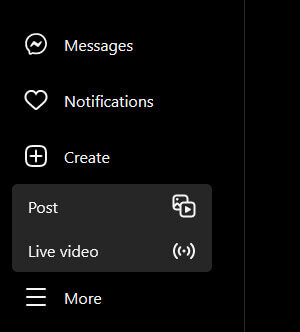
Step 2: Click on the Create button (represented by a plus sign).
Step 3: Choose "Live video" from the drop-down menu.
Step 4: Enter the title for your live video and designate the audience as either "Practice" or "Public". Opting for "Practice" ensures a private broadcast, visible only to you.
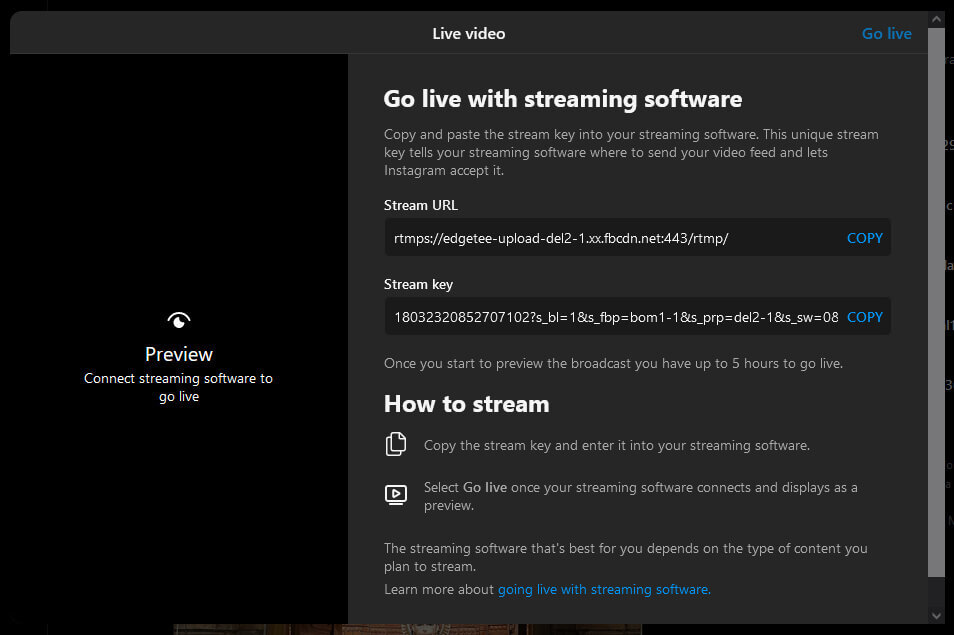
Step 5: Hit "Next," and your Instagram Live stream key and stream URL will be visible. It's essential to note that the stream key for Instagram changes for each new Instagram Live broadcast.
Part 2: Ways to Protect Your Instagram Stream Key
Securing your Instagram Stream Key is crucial to prevent unauthorized access and protecting the integrity of your live broadcasts. Here are several effective ways to enhance the security of your Instagram Stream Key:
Keep it Confidential
First of all, it is essential to maintain confidentiality. Be sure to treat your Instagram RTMP Stream Key like a password. Avoid sharing it openly or with unauthorized individuals. Share it only with trusted team members or collaborators who need access.
Use Two-Factor Authentication
Enable two-factor authentication for your Instagram account. This adds an extra layer of security, ensuring that even if someone gains access to your login credentials, they would still need an additional verification step.
Regularly Update Your Password
Change your Instagram account password regularly. This practice minimizes the risk of unauthorized access, especially if your account information has been compromised elsewhere.
Monitor Third-Party Applications
Be cautious about granting access to third-party applications. Only use reputable and trusted streaming software, and review and revoke access for any applications that you no longer use or trust.
Part 3: Best Streaming Camera to Level Up Your Streaming Videos
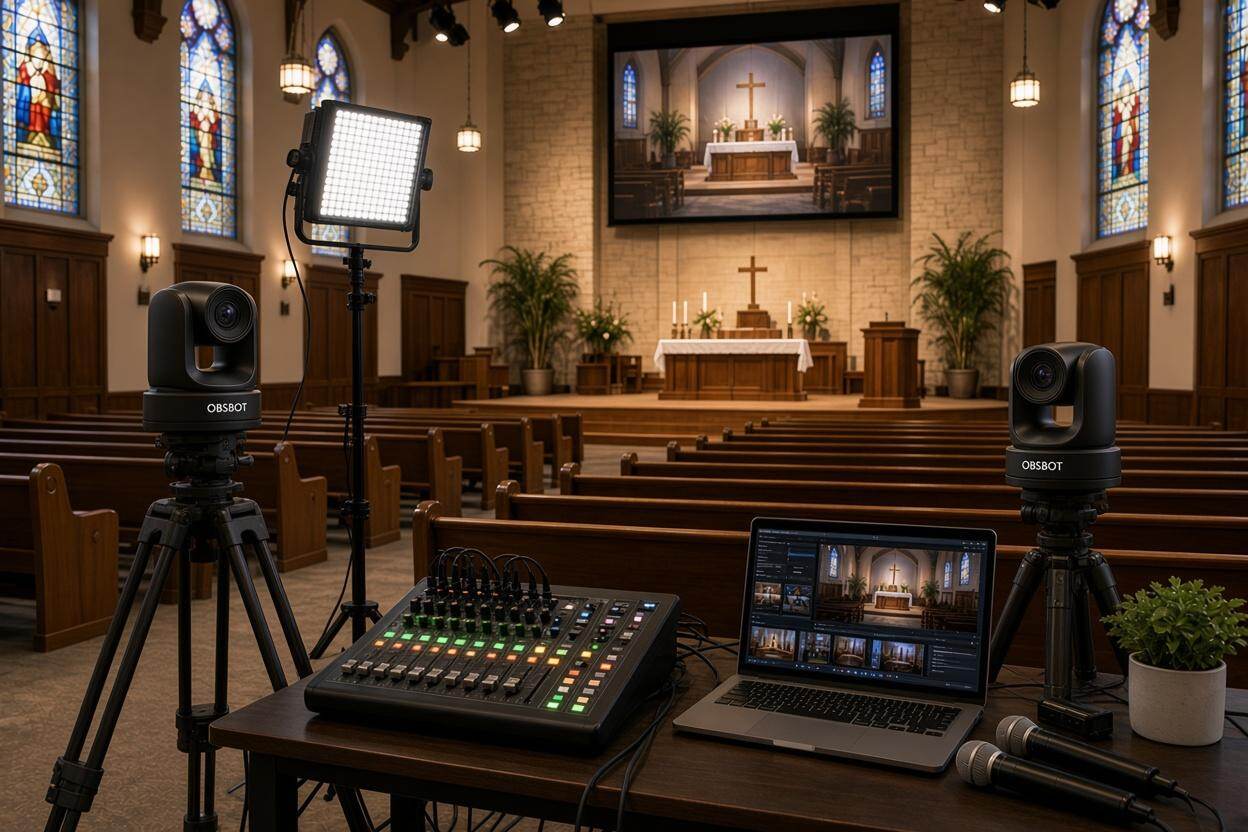
If you are a content creator and looking for a good camera to engage in video streaming, the OBSBOT Tail Air Streaming Camera is the camera option that you can consider. Its Advanced AI Auto Tracking ensures dynamic subject tracking with precision, making it effortless to capture every moment. The Seamless NDI Connectivity and Multi-port Connections offer versatile integration into various setups, enhancing accessibility and adaptability, and this camera enhances your Instagram streaming experience with precision and ease.
Key Features:
- Advanced AI Tracking is highly capable of tracking humans, animals, and objects with precision, providing an excellent streaming experience.
- UHD Resolutions up to 4K@30fps / 1080P@60fps ensure the recorded footage is sharp and highly detailed.
- Seamless NDI Connectivity and Multi-port Connections.
- With the Exclusive App Support, users can easily control and manage the camera and start a live stream on the go.
- The camera has a large 2μm pixel size and an f/1.8 aperture, enabling it to capture bright frames and reveal finer details even in challenging, dim environments.
Part 4: FAQs about Instagram Stream Key
1. How to Get an Instagram RTMP URL?
To get the Instagram RTMP URL, follow the same process you use to get your stream key:
- Log in to your Instagram account via a computer.
- Click the "Create" button (plus sign) and select "Live Video".
- Choose your live video title and audience (public or private).
- Click "Next", and your Instagram live stream key and RTMP URL will appear on the screen.
Remember, the stream key for Instagram changes every time you go live.
2. Can You Use OBS on Instagram Live?
Yes, you can use OBS for Instagram Live streaming. However, Instagram does not provide an official way to stream with OBS directly. To stream on Instagram using OBS, you'll need to use third-party tools like StreamYard, YellowDuck, or other similar software that can integrate your OBS stream with Instagram's live platform. These tools will allow you to connect your Instagram live stream key with OBS.
3. How to Create a Live Link in an Instagram Post?
No, you cannot directly add a live link in a regular Instagram post. Instead, you can inform your followers about your upcoming live stream and encourage them to visit your profile when you go live. You can also use Instagram Stories to share the live stream link with a "Link" sticker, available to all users regardless of follower count.
4. How Do You Share a URL on Instagram?
You share URLs on Instagram primarily through Instagram Stories using the Link Sticker or in your profile bio, as direct clickable links aren't supported in regular feed posts (except for Shopping tags). Here's how to share a URL:
- In Instagram Stories: Tap the sticker icon, select "Link," paste your URL, customize the text (e.g., "Visit Site"), and place it on your content before posting.
- In your profile bio: Go to "Edit Profile," add the link to the "Website" field, and save your changes.
5. Can You Still Live Stream on Instagram?
Yes, you can still live-stream on Instagram. Instagram allows users to broadcast live through its app. Just click the "Create" button and select "Live Video" to start your broadcast. To stream with software like OBS, you need to use a third-party service to generate the Instagram stream key and connect OBS with Instagram.
6. What is a Live Stream URL?
A live stream URL is the web address that allows access to your live broadcast. It is unique to each live session and contains your Instagram stream key embedded within it. This URL can be shared with your audience to join the live session. In the case of Instagram, the URL will be provided after you initiate the live stream process.
7. Is the Instagram API Free?
Yes, Instagram's basic API access is free for developers and users. However, Instagram doesn't provide native RTMP streaming support through its API. To stream with professional software like OBS, you'll need third-party services that integrate with Instagram. Some of these services are free, while others require a subscription. The OBSBOT Tail Air camera offers seamless streaming capabilities with its NDI connectivity and multi-port connections.
8. How Many Followers Do You Need to Get a Stream Key?
No minimum follower count is required to get an Instagram stream key. Any verified Instagram account can access live streaming features and obtain a stream key, regardless of follower numbers. Simply log into your account on a computer, create a live video, and Instagram will generate your unique stream key. This makes live streaming accessible to creators using quality equipment like the OBSBOT Tail Air camera.
Final Words
In conclusion, Instagram Stream Key will be helpful for you to have a live streaming experience, and you must consider the ways to maintain the security and integrity of your live broadcasts. Well, if you are a content creator starting your live streaming journey, consider the OBSBOT Tail Air as your go-to streaming device. Its reliability and versatility make it a recommended choice for content creators and streamers looking to elevate their online presence.