The Best Podcast Setup for Two People
Podcasting is an efficient way to communicate your ideas and thoughts to a global audience. Podcasting with two people is more complicated, but the content is more engaging and dynamic. If you want to podcast make, ensuring good audio quality and a smooth recording session requires setting up and equipping a professional recording studio.
This blog provides the necessary steps and tips for implementing a great podcast setup for two people, ensuring a smooth and enjoyable process.
Part 1: The Best Podcast Setup for Two People
Getting the right podcast gear and equipment is key to creating the best setup. It is not difficult to create a two-podcast setup. Listed below are the components necessary to create the podcast setup for two.
1. Microphone
A crucial aspect of successful podcasts is audio quality, ranging from average to exceptional. To captivate your audience, investing in a high-quality microphone setup is essential for clear and crisp sound. Consider the following microphone options:
- Dynamic Microphones: Dynamic mics have become one of the most widely used audio devices in podcasting. Despite their affordability, they are durable and have good sound quality.
- Condenser Microphones: Condenser microphones produce studio-quality sound and are a great option for high-end recording. While they have a higher price tag than dynamic microphones, they are often worth the money.
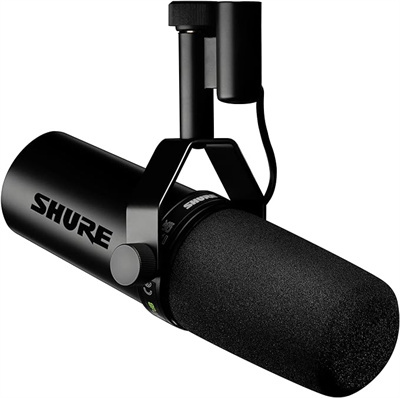
If you are unsure about which microphone to choose, consider the Shure SM7B. It is a dynamic microphone and is a top choice for many podcasters. Known for its robust construction, it offers exceptional sound quality and versatility. With this microphone, you get multiple sound signatures to go with the type of voice or instrument you want.
2. Recording Webcam/Camera
The podcast camera is crucial equipment that will take your podcast recording to the next level. Whether you're recording interviews, discussions, or simply catching up with a friend, a good webcam can make all the difference in bringing your podcast to life.
For those seeking the ultimate podcast webcam, the OBSBOT Tiny 3 Lite 4K PTZ Webcam is a standout choice. Embracing the "Tiny in size, Titan in power" philosophy, it is the world's smallest 4K PTZ camera, perfect for a podcast setup for two people. It features a professional 1/2'' CMOS sensor and advanced AI Tracking 2.0 with Perfect Framing, ensuring both hosts stay in focus effortlessly. With UHD 4K resolution, voice control, and a stereo mic system with voice locater, it delivers professional production quality without the need for a camera operator.
3. Audio Interface
The audio interface you need for an XLR microphone is also needed. An audio interface enables XLR microphones to be connected to a computer. The use of a USB microphone does not require the use of an audio interface.
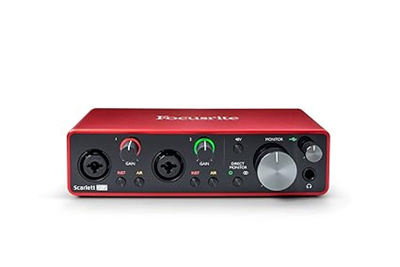
One of the audio interfaces that can help podcasters greatly is Focusrite Scarlett 2i2 (3rd Gen). With two high-headroom inputs to plug instruments like a guitar or microphone, an easy-to-use design, and great sound quality, it is an ideal option for starting your podcast.
4. Headphones
If your podcast sounds fabulous on your computer speaker or smartphone, get a good pair of headphones for editing and listening to the final version. When conducting interviews, the voice of the interviewer mustn't produce distortions.
The market is full of different headphones, so deciding which one is right for you can be difficult for your podcast equipment kit for 2. Keep these things in mind:
- Closed-Back Headphones: These headphones block out outside noise, making them perfect for listening or editing in noisy places.
- Open-Back Headphones: Open-back headphones allow users to listen to live music while hearing their surroundings.
- Noise-canceling Headphones: If you're podcasting in a noisy space (for example, in a coffee shop), these headphones will help you focus on your audio by drowning out unwanted sounds.
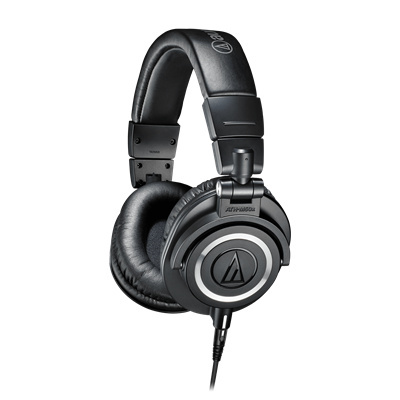
If you want to start the setup for your podcast, you can go with Audio Technica ATH-M50x. Perfect for podcasting, these headphones provide great comfort, excellent sound quality, and exceptional clarity. Though it is a bit costly for starting a podcast, it is worth it.
Part 2: How to Set Up a Podcast for Two People?
In order to begin the process of recording a podcast with two people, it is important to plan and prepare in advance. Here are the steps you must follow to record smoothly and successfully with a two-person podcast setup.
Think about the concept and format for your podcast
The first step in creating a podcast is determining its concept and format. Do you want to explore a particular theme or topic? How will it be formatted? Will it be an interview show, a conversation show, or a combination? By clearly defining your podcast's concept, you will be able to stay focused while recording.
Think of topics, segments, or recurring features you might want to include. Besides creating engaging content, the two hosts will also be able to have organized and structured conversations.
Plan and script your episodes
The creation of an outline or script will help you keep your topic on track and ensure all of the important points are covered. In some podcasts, spontaneity is the key, but a loose structure or key talking points can help keep the conversation on topic and avoid disorganization.
Set recording dates and coordinate schedules
Coordination of schedules and establishing recording times are essential when there are two people involved. Take into consideration the availability of your team, your time zone, and any potential conflicts. The right scheduling tool facilitates the process and eliminates last-minute changes and cancellations.
Get to know each other's styles and dynamics
When co-hosting a podcast, it is important to learn about each other's communication styles and dynamics. This familiarity will contribute to harmony and balance in the conversation. Practice recordings or in-person discussions can help you establish rapport and discover your strengths, preferences, and weaknesses.
Continually improve based on feedback
Gather feedback from listeners after each podcast recording session. Hosts or guests should communicate openly and accept constructive criticism. Feedback loops can help identify areas for improvement, regardless of whether they relate to the content, the delivery process, or the technical aspect of it.
Part 3: How Do I Record a Podcast with Two People Remotely?
1. Use Remote Recording Software
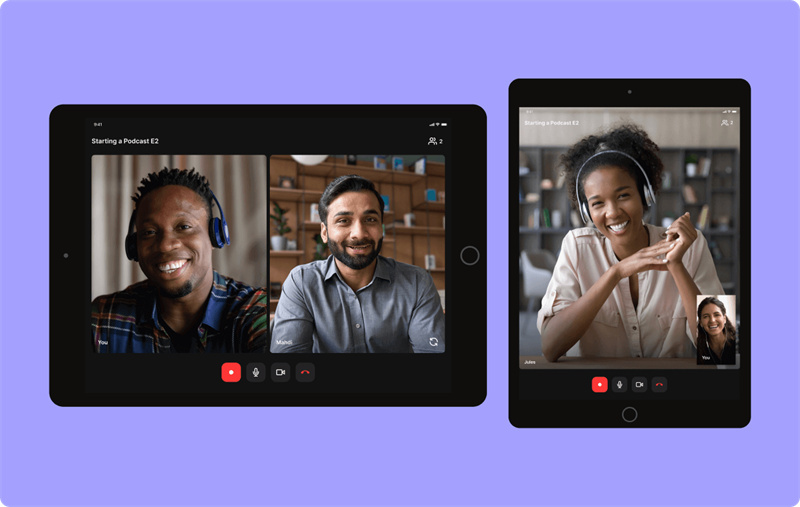
Remote recording software provides a convenient and efficient way to capture high-quality audio and video from multiple participants in different locations. Platforms like SquadCast, Zencastr, and Riverside.fm offer features such as local recordings, automatic audio syncing, and real-time communication to ensure a smooth recording experience. By using remote recording software, you can achieve professional-grade recordings with minimal technical hassle.
2. Record Phone Calls with a Mixer
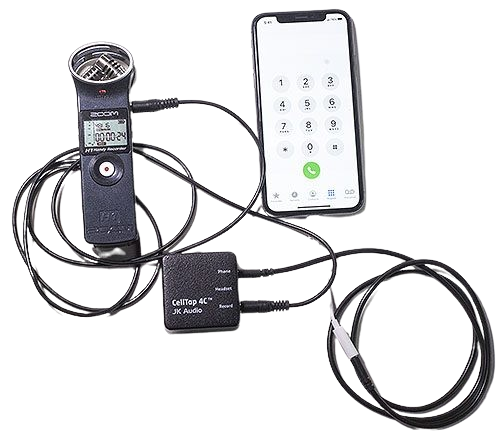
When your guest does not have access to Wi-Fi or is not technologically savvy, you can record your conversation by calling them. The audio on phone networks is compressed even more heavily than that on remote recording software, so this is a last resort option.
Ensure your telephone is connected to your mixer to record the call. To ensure you cover all your bases, both people should record their audio.
3. Make a Double-ender
It involves two or more people recording audio files on separate computers and editing them using podcast software. This is a local recording, so the audio quality is superior, and audio editing is minimized. However, they can be difficult to set up and do not work well with video recordings.
FAQs About Podcast Setup for Two People
1. How to set up a podcast for 2 people?
Setting up the podcast is quite simple if you have the right equipment. For every host, you need headphones, a mic, and a recording device. It is better to set up everything in a quiet space. In addition, you should invest in an audio interface that helps manage multiple mics at once.
2. How to record a podcast with 2 people in different locations?
You can record such podcasts remotely by using online recording tools. These tools help record every speaker’s audio. Both people on the podcast should have a stable internet connection and good headphones. This helps reduce the dropouts and echo. Remote recording is possible, but you have to focus on the connection quality.
3. How to record a podcast on an iPhone with 2 people?
You can record a two-person podcast on an iPhone using a recording app and an external microphone or splitter. Each person should speak into their own mic for better clarity. This setup works best for casual or mobile podcasts. Compared to desktop setups, iPhone recording is more portable but offers fewer editing controls.
4. How to record a podcast with someone else remotely?
Recording a remote podcast involves using software that records both participants while you talk online. Each person records their own audio to avoid quality loss. This method is common for interviews and co-hosted shows. Compared to basic call recordings, dedicated podcast platforms produce cleaner, more professional results.
5. Can a podcast have two hosts?
Yes, many podcasts successfully feature two hosts. A co-hosted format allows natural conversation, different perspectives, and shared responsibility. However, good coordination and clear roles are important to avoid overlap. Compared to solo podcasts, two-host shows often feel more dynamic and engaging for listeners.
6. What is the best platform to record a podcast?
There is no single best platform, as the right choice depends on your recording style and location. Some platforms focus on remote recording, while others work best for in-person sessions. Reliability, audio quality, and ease of use matter most. For video podcasts, pairing recording software with an AI-powered 4k PTZ Webcam like OBSBOT Tiny 3 Lite can enhance overall production quality.
Conclusion
A professional podcasting environment can be created with the right equipment and setup, making you and your guest happier. Ensure a top-notch podcast setup for two with a smooth 4K webcam, seamless audio, and interactive AI features.