6 Best Webcams for Podcast: Top Picks for 2026

Podcasters know that clear video can make your podcast more professional and nice to watch. The best webcam for podcast helps shoot sharp videos and can handle different lighting conditions. In addition, most of them use autofocus to keep your face in focus. However, many podcasters don't buy the cameras because they are expensive. This is why we are reviewing the best webcams, so you don't have to spend thousands of dollars and still get exceptional videos.
Part 1: 6 Best Webcams for Podcasts
This section includes the 6 podcast webcam comparisons to help you choose a webcam that meets the different recording needs of podcasters. We will compare their important features, so you can make the right choice.
Comparison Table
|
Webcam |
Resolution | Sensor | FOV | Microphone | Price |
|---|---|---|---|---|---|
|
YoloLiv YoloCam S3 |
4K@30/25fps 1080p@60fps |
1/1.3'' Sensor | 83° |
No built-in microphone |
$199 |
|
OBSBOT Tiny 3 Lite |
4K@30fps 1080p@120fps |
1/2'' CMOS | 79.1° DFOV 66.9° HFOV |
3-mic immersive stereo system |
$199 |
| Elgato Facecam 4K | 4K@60/30fps 1080p@60/30fps |
1/1.8" Sony STARVIS 2 CMOS |
90° | No built-in microphone | $199.99 |
| Insta360 Link 2 | 4K@30/25/24fps 1080p@60fps |
1/2" sensor | 79.5° DFOV 67° HFOV |
Dual built-in mic with AI noise-canceling |
$199.99 |
| Logitech MX Brio | 4K@30fps 1080p@60fps |
8.5MP Sony STARVIS | 90°/78°/65° |
Dual beamforming microphones |
$199.99 |
| Razer Kiyo Pro Ultra | 4K@30fps 1080p@60/30/24fps |
1/1.2" Sony STARVIS 2 IMX585 | 82° without LDC 72° with LDC |
Stereo omnidirectional microphones | $399.99 |
1. YoloLivYoloCam S3

Built for creators seeking a more camera-like look from a desktop setup, this is a good webcam for podcast that focuses on natural subject separation and precise image control. For podcast hosts, YoloLivYoloCam S3 helps produce polished talking-head footage while offering useful manual adjustments that keep long recording sessions visually consistent.
Key Features:
- F/1.85 aperture improves exposure in darker studios
- 24mm focal length suits close desktop setups
- Natural bokeh separates speakers from studio backgrounds
- Manual exposure prevents brightness shifts during recordings
- Quick zoom reframes speakers without moving equipment
- Focus adjustment keeps changing subject distances sharp
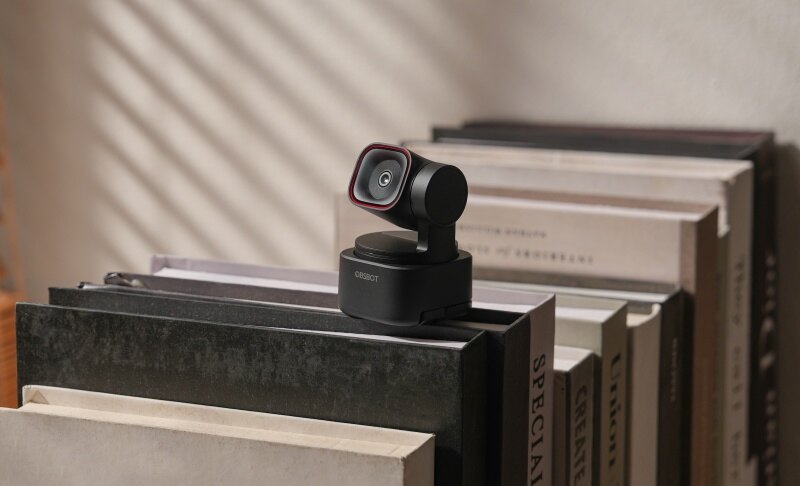
2. OBSBOT Tiny 3 Lite
Solo commentary, guest interviews, and roundtable episodes all demand different camera behavior. That flexibility is where OBSBOT Tiny 3 Lite stands out. Instead of locking creators into one recording style, this podcast video camera pairs automated framing, adaptable audio tools, and saved positioning options that suit changing podcast formats without forcing major setup changes.
Key Features:
- Dual Recording Modes: Records at 4K@30fps or 1080p@120fps, giving podcasters a choice between detailed interview footage and smoother motion.
- AI Tracking 2.0: Follows people and objects, while Voice Tracking uses Voice Locator to identify an active speaker and rotate the gimbal toward them, reducing manual camera operation.
- Detailed & Crisp Audio: A three-microphone immersive stereo system supports 24-bit/48kHz recording, offering greater headroom for loud voices during podcast recording.
- Five Audio Modes: Let creators change pickup behavior with one-click switching as you can optimize capture for solo speech, group discussions, or broader room sound for podcasts.
- AI Color Tuning: The AI Image Signal Processor analyzes lighting and contrast in real time to maintain more consistent skin tones and color accuracy to manage podcasts with artificial studio lighting.
3. Elgato Facecam 4K

A dedicated podcast setup benefits from equipment designed around controlled, desk-based production. Fixed focus covers typical seated distances, while Stream Deck integration in this best affordable camera for podcasting speeds up camera changes, and Prompter compatibility supports scripted segments. With no built-in microphone competing for hardware resources, video remains the clear priority of the Elgato Facecam 4K.
Key Features:
- Uncompressed USB transmission preserves detail with lower latency
- 49 mm filters reduce glare or soften skin
- Manual ISO and shutter settings stabilize studio exposure during long recordings
- Adjustable 2D/3D noise reduction cleans darker footage in dim studios
- On-device flash memory recalls preferred camera settings
- RTX face tracking maintains framing during host movement
4. Insta360 Link 2

For podcast hosts who move, demonstrate products, or switch between sitting and standing, framing becomes part of the production challenge. Insta360 Link 2 handles that with motorized tracking, gesture control, and specialized shooting modes. This best webcam for video podcast is especially useful for solo creators who want dynamic camera movement without another person operating the setup.
Key Features:
- AI tracking follows hosts during moving podcast segments
- Gimbal movement keeps solo presenters naturally centered
- Gesture controls adjust framing without interrupting conversations
- PDAF quickly refocuses when hosts change position
- DeskView captures products during demonstration-based podcast episodes
- Voice Focus isolates solo hosts from room noise
5. Logitech MX Brio

A polished podcast can quickly look uneven when daylight shifts, guests lean forward, or tabletop items enter the frame. Those are the situations where Logitech MX Brio earns its place. Its adaptive image controls and Show Mode help creators manage changing scenes without stopping conversations or rebuilding their setup. So, this is the best webcam for streaming a podcast live as well.
Key Features:
- RightLight 5 corrects backlit faces during interviews
- HDR preserves facial detail beside bright studio windows
- Show Mode reveals notes without repositioning podcast cameras
- Four-times digital zoom tightens remote guest framing quickly
- Dual beamforming mics suppress side noise during backup recording
- USB 3.0 connection supports stable, high-bandwidth podcast capture
6. Razer Kiyo Pro Ultra

Dim lighting can give a podcast studio a cinematic mood. However, it often makes faces appear grainy or poorly exposed. Strong light handling becomes especially valuable when recording long conversations after dark. Razer Kiyo Pro Ultra addresses this with bright optics, hardware bokeh, and saved camera controls that support a controlled studio look.
Key Features:
- F/1.7 aperture brightens hosts under mood lighting
- Face-tracking autofocus follows speakers leaning toward microphones
- Auto exposure corrects faces under uneven studio lighting
- Optical bokeh separates hosts without software background effects
- Synapse controls ISO for consistent multi-episode studio exposure
- Onboard memory retains camera settings between podcast sessions
Part 2: How to Choose the Best Webcam for Podcast
Do not choose a webcam based on resolution alone when you need the podcast recording equipment. This section includes the most important factors that you need to consider while choosing a webcam.
Resolution and Frame Rate
Look for at least 1080p, while 4K gives you more detail and room to crop during editing. A 30 fps camera works well for a seated conversation, while 60 fps creates smoother motion. If you regularly hold products in front of the camera or make fast hand movements, 1080p60 or 4K60 can make those actions look cleaner.
Sensor Size
Sensor size affects how well a webcam gathers light. Larger sensors generally have an advantage in darker environments and can produce cleaner images. A 1/1.2-inch or 1/1.28-inch sensor is large for a webcam. If your podcast room uses soft decorative lighting instead of strong studio lights, sensor size becomes more important than simply choosing the highest resolution.
Lens Aperture
Aperture is shown as an f-number, such as f/1.7 or f/2.0. A lower number generally means the lens can let in more light. This can help when recording at night or in a dim room. For example, a host using only a soft key light may benefit more from an f/1.7 lens than someone recording beside a bright window.
Autofocus
Autofocus keeps your face or an object sharp when its distance from the camera changes. PDAF and other fast autofocus systems are useful for creators who show products during an episode. A fixed-focus webcam can work perfectly well when you remain seated at the same distance, but autofocus provides more freedom when you lean forward or move around.
Field of View
Field of view, or FOV, controls how much of the room the camera captures. Around 70 to 80 degrees works well for many single-host shots. A 90-degree view can make it easier to include two speakers. If you record alone at a small desk, an extremely wide view may reveal unwanted parts of the room and require extra cropping.
Camera Controls
Good software should give you control over exposure, white balance, focus, contrast, ISO, shutter speed, and framing. Automatic settings are convenient, but they can change halfway through an episode. In a studio with fixed lights, locking exposure and white balance can keep every shot consistent. This is one of the most useful skills when learning how to adjust webcam settings.
Part 3: Tips for Improving Your Video Podcasts
Buying a better webcam is only part of improving video quality because you should know the best way to record a podcast, too. Lighting, camera placement, sound, background design, and editing can make an inexpensive camera look much better.
- Good Lighting: Place a soft light slightly above eye level and 30 to 45 degrees from your face, and avoid bright windows behind you.
- Put the Camera at Eye Level: Keep the webcam around eye level and about an arm's length away for a natural angle.
- Record Audio Separately: Use a quality USB or XLR microphone instead of relying only on the webcam microphone.
- Lock Important Camera Settings: Lock exposure and white balance when possible to keep the picture consistent throughout the recording.
- Keep the Background Simple: Remove clutter and leave some distance between yourself and the wall to create a cleaner frame.
- Use Reliable Recording Software: Use OBS Studio or a remote podcast platform, and make a short test recording to check framing, sound, focus, and synchronization.
Part 4: FAQs About the Best Webcam for Podcast
1. What type of camera should I use for a podcast?
A 1080p or 4K webcam is enough for most video podcasts. Choose a model with reliable autofocus, good low-light performance, and manual image controls. Mirrorless cameras offer greater flexibility but usually require more equipment, setup time, and money.
2. What is the best webcam for podcasting?
The best choice depends on your recording style. YoloCam S3 offers a large sensor and detailed controls, while OBSBOT Tiny 3 Lite and Insta360 Link 2 suit moving hosts. Razer Kiyo Pro Ultra is especially strong in low light.
3. Can you recommend software for recording and editing video podcasts?
OBS Studio is a popular free option for local recording and live streaming. DaVinci Resolve and Adobe Premiere Pro offer advanced video editing. Remote recording platforms such as Riverside can also help capture separate audio and video tracks from guests.
4. What equipment is needed for a podcast?
A basic video podcast setup needs a computer, webcam, microphone, headphones, lighting, and recording software. You can add a microphone arm, audio interface, tripod, acoustic treatment, external storage, and extra cameras as your production becomes more advanced.
Conclusion
Choosing a camera for a video show is about creating a viewing experience that feels natural, clear, and dependable. Think about the space where you film, how much you move, the amount of available light, and how much control you want over the picture. A creator working from one chair has different needs from a host who presents across an entire room. The best webcam for podcast production is ultimately the one that fits your workflow, works reliably with your computer, and helps you publish polished episodes without making production unnecessarily difficult.