Top 7 Portable Webcams You Need in 2026

Portable webcams like OBSBOT Meet Flip, Insta360 Link 2C Pro, and Cam Sync 4K (V2) are reshaping how people work and create. As remote work, online lectures, and content creation become the norm, a compact, lightweight webcam you can carry anywhere — from your desk to a café—has become essential. Here are the 7 best portable webcams worth your trust.
Part 1: 7 Best Portable Webcams
These are the top 7 portable webcam options based on compact design, video performance, and travel-friendly features.
|
Model |
Resolution (fps) | Size | Weight | Connectivity | Mounting | Price |
|---|---|---|---|---|---|---|
|
Anker PowerConf C200 |
2K@30fps, 1080p@30fps, 720p@30fps | 61 × 51 × 41 mm | ~82g | USB-C | Clip + tripod | $59.99 |
|
Creative Live! Cam Sync 4K |
4K@25fps, 1080p@40fps | 106 × 57.5 × 53.2 mm | 103g | USB-A / USB-C | Clip + tripod | $59.99 |
|
OBSBOT Meet Flip |
4K@30fps, 1080p@60fps | 41.6 × 36.9 × 31.9mm | 37.7 g | USB-C | Plug and Play& Unibody Adjustable Stand |
$119 |
|
EMEET SmartCam S800 |
4K@30fps, 1080p@60fps | 71.5 × 52 × 71 mm | 180g | USB 3.0 | Tripod | $149.99 |
|
Insta360 Link 2C Pro |
4K@30fps, 1080p@60fps | 62.7 × 30.2 × 26 mm | 48.5g | USB-C | Magnetic + tripod | $199.99 |
|
HP 960 4K Streaming Webcam |
4K@30fps, 1080p@60fps | 41.4 × 43.4 × 86.7 mm | 225g | USB-A (USB 3.0) | Clip + tripod | $209.76 |
|
Logitech Mevo Start |
1080p@30fps | 75.5 × 34 × 87 mm | 232g | Wi-Fi, USB-C, Ethernet | Tripod / stand | $449.99 |
1. Anker PowerConf C200
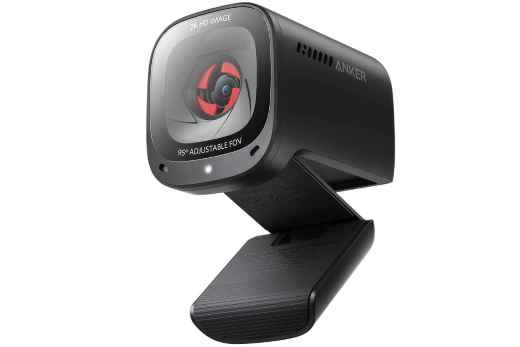
The Anker PowerConf C200 is a compact, budget-friendly portable webcam built for users who want reliable 2K video and clear audio without a steep price tag. It pairs sharp imaging with AI-driven microphone processing and an adjustable field of view, making it a practical choice for anyone who needs a lightweight webcam that travels easily between a home office, a shared desk, or a laptop bag.
Key Features:
- 2K Ultra-Clear Resolution: Captures sharp, professional-looking video at 2K@30fps (with 1080p@30fps and 720p@30fps options).
- Adjustable Field of View: Switch between 65°, 78°, and 95° via the AnkerWork software to frame just your face or include more of the background.
- AI Noise-Canceling Dual Mics: Built-in dual stereo microphones use AI processing to pick up your voice clearly while suppressing background noise.
- Low-Light Correction: A larger aperture captures more light, keeping video bright and clear even in dim settings.
- Built-In Privacy Cover: A slide-on cover shields the lens when the camera isn't in use.
Compact, Travel-Friendly Build: About 61 × 51 × 41 mm and 82g, with autofocus and USB-C plug-and-play connectivity.
2. Creative Live! Cam Sync 4K

The Creative Live! Cam Sync 4K is a feature-rich and best external webcam designed for users who need flexible performance across meetings, streaming, and content creation. With intelligent imaging controls and adaptable framing capabilities, it ensures reliable visual output and user control in varied environments without requiring complex setup or additional equipment.
Key Features:
- Delivers consistent exposure using adjustable backlight compensation levels
- Dual digital mics for clear audio capturing
- Manual focus ring enables precise subject distance control
- SmartComms VoiceDetect automates mute and unmute intelligently
- NoiseClean-out suppresses outgoing background interference via software
- Integrated privacy cover prevents unintended camera activation
3. OBSBOT Meet Flip Foldable 4K Webcam
If there's one webcam on this list worth stretching your budget for, it's the OBSBOT Meet Flip. At just under $119, it delivers advanced AI features like intelligent tracking and framing, AI Note Taker, a foldable auto-power design, and 4K imaging—features that are hard to match at this price point. If you're choosing between a basic $60 webcam and the Meet Flip, spending about $60 more gets you significantly more versatility for meetings, streaming, and content creation. For the AI features, imaging quality, and value it offers, the Meet Flip is our top recommendation in this roundup.
Key Features:
- 4K High-Quality Video: Capture sharp and professional-looking video with 4K@30fps resolution, ensuring clear visuals for online meetings, presentations, and content creation.
- Ultra-Portable Design: Weighing only 37.7g, Meet Flip features a compact foldable design that easily fits into a bag or laptop sleeve, making it ideal for business trips, remote work, and on-the-go video calls.
- Foldable Privacy Design: The innovative flip design automatically powers on when opened and physically covers the lens when closed, providing instant privacy protection without the need for an extra lens cap.
- Unibody Adjustable Stand: The built-in adjustable stand allows quick mounting on laptops, monitors, or tripods, offering flexible setup options wherever you work.
- Plug-and-Play USB-C Connectivity: Connect Meet Flip directly via USB-C for a quick and hassle-free setup, making it easy to use across different workspaces.
4. EMEET SmartCam S800

The EMEET SmartCam S800 is a high-performance portable webcam designed for users who need professional video quality on the go. It combines a compact design with a large Sony sensor, fast autofocus, and AI enhancements, making it ideal for streaming, remote work, and travel-friendly video conferencing setups.
Key Features:
- PDAF+TOF autofocus locks focus within 0.3 seconds
- Dual noise-canceling microphones capture audio within 10ft
- 4x digital zoom enables flexible framing in tight spaces
- Adjustable 40°–73° field of view suits mobile setups
- Built-in privacy cover enhances secure portable usage
- 10–300cm focus range adapts to desk and handheld distances
5. Insta360 Link 2C Pro

The Insta360 Link 2C Pro is an advanced and best portable webcam built for users who need intelligent framing and high-end imaging in flexible setups. With AI-driven features, sensor-level enhancements, and creative shooting modes, it delivers a dynamic video experience suited for professionals working across meetings, streaming, and mobile content environments.
Key Features:
- 1/1.3" sensor with 2.4μm pixels enhances detail capture
- Dual Native ISO (100–3200) improves dynamic range processing
- PDAF autofocus supports 12cm to infinity focus accuracy
- Fixed 83.9° DFOV enables balanced framing and coverage
- Dual mics (directional + omnidirectional) with AI noise-canceling and beamforming
- Smart Whiteboard and DeskView modes enhance presentations
6. HP 960 4K Streaming Webcam

The HP 960 4K Streaming Webcam is an AI-driven portable laptop webcam designed for creators and professionals who need automation and image optimization. With intelligent framing, color processing, and software integration, it delivers a refined video experience, making it suitable for dynamic environments where consistent on-camera presentation and control are essential.
Key Features:
- AI face tracking maintains centered framing during movement
- Dual noise-reducing microphones optimized for conferencing clarity
- Multi-FOV options (100°/90°/78°) enable adaptive framing control
- Sony STARVIS sensor enhances detail in challenging lighting
- 4× digital zoom allows precise subject isolation adjustment
- Poly Lens software allows advanced image parameter customization
7. Logitech Mevo Start

The Logitech Mevo Start is a wireless, app-controlled external USB webcam for laptop built for creators who need mobility and advanced streaming control. It combines integrated streaming protocols, remote production tools, and onboard processing to deliver flexible live video workflows, making it ideal for users managing content across multiple locations without traditional wired setups.
Key Features:
- Auto-Director intelligently switches scenes during live production
- NDI, RTMP, and SRT enable flexible streaming workflows
- 3 MEMS mic array with Fraunhofer upHear spatial audio support
- Electronic image stabilization ensures smoother handheld video output
- Dual-band Wi-Fi with MIMO supports stable wireless streaming
- Local recording via microSD enables backup during streams
Part 2: How to Choose a Portable Webcam
When choosing a portable camera for computer, the most important factors are size, weight, video quality, connectivity, mounting flexibility, and built-in features.
1. Size and Weight
Portability isn't just about being small; it's about form factor efficiency and material design. Look for webcams under 200-300 grams with compact dimensions and foldable or collapsible mounts. Engineering details like hinge durability, clip force distribution, and use of lightweight alloys or reinforced plastic determine whether the device can withstand frequent packing.
2. Video Resolution and Frame Rate
Resolution should be at least 1920×1080 (Full HD), while 4K (3840×2160) is preferred for professional use. Frame rate matters equally because 60fps provides smoother motion rendering than 30fps. Also consider encoding formats like H.264/H.265, which compress video efficiently without major quality loss.
3. Connectivity
Most modern webcams rely on USB interfaces, but the version matters. USB 2.0 supports basic 1080p streaming, while USB 3.0 or higher (up to 5 Gbps bandwidth) is required for stable 4K output. USB-C improves power delivery and reversibility. Ensure the webcam supports UVC (USB Video Class) standards for true plug-and-play compatibility.
4. Mounting Options
Mounting flexibility depends on mechanical design and interface standards. A well-designed clip should support different screen thicknesses while maintaining stability. Advanced models include magnetic mounts or 360° rotational hinges for quick repositioning.
5. Audio Quality
Built-in microphones vary significantly in quality. Look for dual-microphone arrays with beamforming technology, which enhances voice capture while reducing background noise. Some webcams also include digital signal processing (DSP) for echo cancellation and noise suppression.
Part 3: FAQs About Portable Webcam
1. Can a webcam work as a Bluetooth camera and microphone?
Most webcams do not work as a Bluetooth camera and microphone because they typically use USB or USB-C connections for more stable video and audio transmission. However, some portable webcam setups can be paired with wireless audio accessories to provide more flexibility for remote work, streaming, and online communication.
2. Are portable webcams better than laptop cameras?
Yes, in most cases, a laptop portable camera provides significantly better performance than a built-in laptop camera. They typically offer higher resolution, better low-light handling, and advanced features like autofocus and AI framing. Additionally, portable webcams allow for better positioning, which can improve framing and overall video quality.
3. Do portable webcams work with all devices?
Most portable webcam models are designed to be universally compatible with laptops, desktops, and even some tablets. They usually connect via USB-A or USB-C and support major operating systems like Windows, macOS, and Linux. However, compatibility may vary for mobile devices or specific software, so it's always recommended to check system requirements.
4. Can I use a portable webcam for streaming?
Yes, a portable webcam can be a great option for streaming, especially for beginners or mobile creators. Many models offer high resolution, good frame rates, and built-in microphones, making them suitable for platforms like Twitch, YouTube, or Zoom. For advanced streaming setups, you may still want additional lighting and audio equipment.
5. How do I set up a webcam on my PC?
To set up a webcam on your PC, connect the webcam through USB or USB-C, wait for your computer to recognize the device, and select it as your preferred camera in video applications. Most modern webcams support plug-and-play setup, allowing you to start video calls, streaming, or recording without complicated installation.
6. What are the best wireless webcams for PC use?
The best wireless webcams for PC use are designed for users who need flexible setups without being limited by traditional wired connections. Options like Logitech Mevo Start offer wireless streaming capabilities, while USB-C webcams such as OBSBOT Meet Flip provide reliable plug-and-play performance for PC users who prioritize portability and image quality.
Conclusion
The right portable webcam comes down to matching your budget, use case, and setup — whether that's the Anker PowerConf C200 for everyday calls, the OBSBOT Meet Flip for ultra-portable travel, or the Logitech Mevo Start for multi-camera streaming. Compare the specs above, and pick the one that fits how and where you actually work.