6 Best Home Office Webcams for Remote Workers

The best home office webcams include OBSBOT Meet Flip, Insta360 Link 2C Pro, Logitech Brio 300, and others. These webcams are suitable for remote online interviews, group meetings, and other remote video calls. In addition, a good home office webcam improves video quality and reduces background noise. This article includes the 6 best options that will make your remote work setup more reliable.
Part 1: 6 Best Home Office Webcams
This section includes the 6 home office webcams perfect for remote workers, such as hybrid teachers, freelance workers, and business professionals.
Quick Comparison Table
| Model | Resolution & FPS | Low-Light Sensor | Microphone | USB Type | Price |
|---|---|---|---|---|---|
| Logitech Brio 500 | 1080p@30fps 720p@30fps |
RightLight 4 with HDR |
Stereo microphone |
USB-C | $129.99 |
| Razer Kiyo V2 | 4K@30fps 1080p@60fps |
8.3MP Sony STARVIS sensor |
Built-in microphone system | USB-C | $149.99 |
| OBSBOT Meet Flip | 4K@30fps 1080p@60fps |
1/2" stacked CMOS sensor |
Intelligent dual-mic system with four audio modes |
USB-C | $119 |
| Opal Tadpole Webcam | 1080p@30fps |
Sony IMX582 Exmor RS sensor |
Directional MEMS VisiMic microphone | USB-C | $118 |
| AnkerWork C310 | 4K@30fps 1080p@60fps |
1/2.5″ sensor |
Dual AI noise-canceling microphones | USB 3.0 | $99.99 |
| Elgato Facecam 4K | 4K@60fps 4K HDR@30fps |
1/1.8-inch Sony STARVIS 2 CMOS sensor |
No built-in microphone | USB 3.0 Type-C | $199.99 |
1. Logitech Brio 500
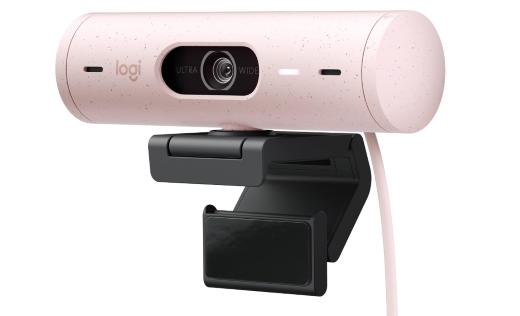
Many remote workers want a dependable webcam for meetings without paying for advanced creator features they may never use. The Logitech Brio 500 focuses on practical home office needs while adding useful features such as automatic lighting correction, auto-framing, and Show Mode. With Full HD video, noise-reducing microphones, and an integrated privacy shutter, this home office camera works well for remote employees, hybrid workers, and professionals who regularly join video meetings.
Key Features:
- RightLight 4 with HDR automatically corrects lighting in challenging office environments
- Autofocus keeps your face clear as you move during virtual meetings
- Integrated privacy shutter protects the camera when it is not in use
- 90-degree field of view provides a wider view for meetings and collaborative workspaces
- RightSight auto-framing keeps you centered as you move during calls
- Show Mode lets you tilt the camera down to present sketches, documents, or objects on your desk
User review:

2. Razer Kiyo V2

Although the Razer Kiyo V2 is far from Mac-friendly in terms of driver support and can run slightly warm during extended 4K use, it remains one of the strongest options in its price range for Windows users. For serious gamers or executives who spend hours in online meetings, the Sony STARVIS sensor delivers exceptional low-light clarity, while the uncompressed image quality sets it apart from most webcams in the $140-plus category. As long as you are using a PC and plugging it directly into the motherboard, those minor drawbacks are easy to overlook once you see the image quality it produces.
Key Features:
- AI auto-framing maintains centered positioning during active presentations
- HDR processing improves contrast across difficult lighting environments
- Ultrawide lens captures larger desk and workspace setups
- DSLR-style controls allow advanced image customization through software
- Uncompressed video encoding preserves sharper streaming image quality
- AI face retouching smooths skin tones during lengthy calls
User review:

3. OBSBOT Meet Flip Foldable 4K Webcam
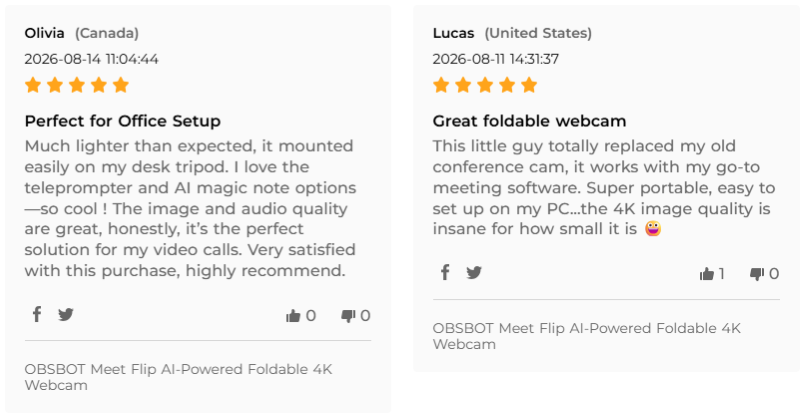
As the most compact 4K webcam in this roundup, the OBSBOT Meet Flip is clearly designed for remote executives who care about desk aesthetics and travel portability. In real-world Zoom and Teams calls, many 4K webcams show noticeable delay in their AI framing when users turn their heads or move around. The OBSBOT Meet Flip responds much more naturally, instantly readjusting the frame when you turn to grab documents or stand up to write, without the distracting blur often seen on traditional webcams. If you prefer not to keep a separate microphone on your desk, its built-in intelligent dual-mic system does an excellent job filtering out traffic noise, car horns, and even nearby construction sounds during home office calls.
Key Features:
- Clear UHD Video: Supports 4K@30fps and 1080p@60fps for sharper and more detailed video during meetings, interviews, and presentations in a remote setup.
- AI Auto Framing: Automatically keeps users centered while they move during calls. This is useful for teachers and presenters who adjust their position while speaking.
- Compact Lightweight Foldable Design: A mini design that fits on small desks, as many remote workers do not have large spaces at home, so a compact webcam helps reduce clutter.
- Built-In Audio System: Includes built-in dual mics with four audio modes that help capture voices more clearly during remote meetings and online classes.
- Plug-and-Play Connectivity: Supports simple USB plug-and-play installation, allowing remote workers to start meetings quickly without difficult setup processes.
User Review:
4. Opal Tadpole Webcam

Why did we choose the Opal Tadpole as our top pick for travel? Although it is limited to 1080p, it uses the Sony IMX582 sensor, the same class of primary camera hardware found in many mid-range smartphones. Compared with traditional webcams like the Logitech Brio 300, which relies on a much smaller 1/4-inch sensor, the Opal offers a significantly larger light-sensitive area. In practical terms, this allows it to produce noticeably cleaner and sharper facial detail, even in challenging mixed-light environments such as train stations or cafés, where ordinary budget webcams often struggle.
Key Features:
- Sony IMX582 sensor delivers sharper, true-to-life image processing
- Directional VisiMic captures focused voice pickup during crowded environments
- Capacitive Tap-To-Mute button instantly silences ongoing conference conversations
- Phase-detection autofocus maintains stable subject clarity while moving
- Six-element f/1.8 glass lens improves visual depth accuracy
- Adjustable silicone clip securely fits most modern laptop displays
User review:

5. AnkerWork C310

Within a $100 budget, the AnkerWork C310 offers rare USB 3.0 bandwidth and 4K transmission. This best video conference camera for home office combines AI-powered automation with advanced imaging technology to reduce setup stress during busy workdays. The webcam is especially useful for users managing virtual collaboration, streaming, and long conference sessions.
Key Features:
- AI framing automatically adjusts composition during active presentations
- YUV encoding improves smoother high-speed video transmission performance
- Integrated privacy cover protects workspace security between meetings
- HDR imaging balances shadows and bright office backgrounds
- f/2.0 aperture improves depth accuracy during virtual conferences
- USB 3.0 bandwidth supports stable high-data video transfer
User review:

6. Elgato Facecam 4K

Some remote professionals want more than standard video calls; they want studio-quality image control for webinars, streaming, presentations, and content production. The Elgato Facecam 4K targets users who value cinematic customization, detailed image processing, and advanced visual controls over basic plug-and-play simplicity. So, this home office video camera works best for users building polished streaming, recording, or presentation setups at home.
Key Features:
- DSLR-style controls enable precise manual exposure customization settings
- Camera Hub software supports cinematic LUT color grading
- Optimized focus range maintains clarity within 1.2 meters
- Native lens-filter compatibility supports professional cinematic visual effects
- 90-degree field-of-view captures wider collaborative workspace framing
- PTZ controls allow flexible digital pan and zoom adjustments
User review:

Part 2: What to Look For in Best Home Office Webcams
Before diving into the details, you might have a slight doubt: How do I set up an efficient home office with the latest technology? Start with your lens. When choosing the best home office video camera, important factors include video quality, microphone performance, lighting support, autofocus speed, compatibility, and privacy features. These features directly affect how professional and comfortable you appear during online meetings.
1. Video Resolution
Resolution determines how clear your video looks during calls. Most remote workers should choose at least a 1080p webcam because it provides sharp and professional video quality. A 4K webcam is even better for presentations, webinars, and client meetings. Higher resolution also improves image detail when using larger monitors.
2. Low-Light Performance
Many home offices do not have studio lighting, so low-light performance is very important. Good webcams use advanced sensors and automatic brightness correction to improve image quality in darker rooms. This feature helps prevent grainy or blurry video during early morning or nighttime meetings when you want the best home office webcam setup.
3. Microphone Quality
A clear microphone is just as important as clear video. Poor audio can make meetings frustrating and unprofessional. Many modern webcams include noise-reduction microphones that reduce background sounds like fans, keyboards, or street noise. This creates cleaner communication during calls.
4. Autofocus and AI Tracking
Autofocus keeps your face sharp even when you move during meetings. AI tracking is useful for presenters, teachers, and content creators because the webcam follows movement automatically. These features help create smoother and more natural video experiences.
5. Plug-and-Play Setup
The best webcam for home office video conferencing should work easily with Zoom, Google Meet, Microsoft Teams, and other webcam and live streaming platforms. Plug-and-play support is important because remote workers often want quick installation without downloading complicated software.
Part 3: FAQs About Best Home Office Webcam
1. What is the best webcam for working from home?
For most people working from home, the Logitech Brio 500 is a great choice, offering clear 1080p video, autofocus, lighting adjustment, and noise-reducing microphones. For 4K video and advanced AI features, the OBSBOT Meet Flip is a better option.
2. Is a 4K webcam really necessary for remote work?
A 4K webcam is not necessary for every remote worker, but it can improve professionalism and video clarity. Users often mention that 1080p webcams are enough for standard meetings, while 4K webcams work better for presentations, webinars, and content creation. A 4K camera also performs better when cropping or zooming digitally because it keeps more detail.
3. Are built-in laptop webcams good enough?
Laptop webcams are usually acceptable for casual meetings, but they often lack sharpness, strong microphones, and color accuracy. Remote workers frequently say external webcams make them appear more professional during interviews and business calls. External webcams also offer better positioning, wider viewing angles, and improved low-light performance.
4. What are the must-have gadgets for a productive home office?
A productive setup usually includes an ergonomic chair, a reliable dual-monitor setup, and a high-speed Wi-Fi router to prevent lag. However, for remote collaboration, a high-quality external webcam and a noise-canceling microphone are the most essential gadgets to ensure clear and professional communication.
5. Can expensive webcams improve productivity?
An expensive webcam cannot directly increase productivity, but it can improve communication quality and reduce technical frustrations. Some users often mention that better webcams reduce distractions caused by blurry video or connection issues. For workers who spend most of their day on video calls, investing in a quality webcam can create a smoother work experience.
Conclusion
Choosing the best home office webcam ultimately comes down to finding the right balance between video quality, ease of use, and budget. For users who only need reliable daily meetings, affordable options like the Logitech Brio 300 work perfectly well. Among all the swebcams discussed, the OBSBOT Meet Flip stands out as the best overall choice because it offers strong 4K quality, useful AI tools, a compact design, and reliable performance for most remote work setups. Investing in a good webcam can make online meetings feel more professional, clearer, and far less frustrating.