What Is Vertical Video? Definition, Aspect Ratio, and Where It’s Used
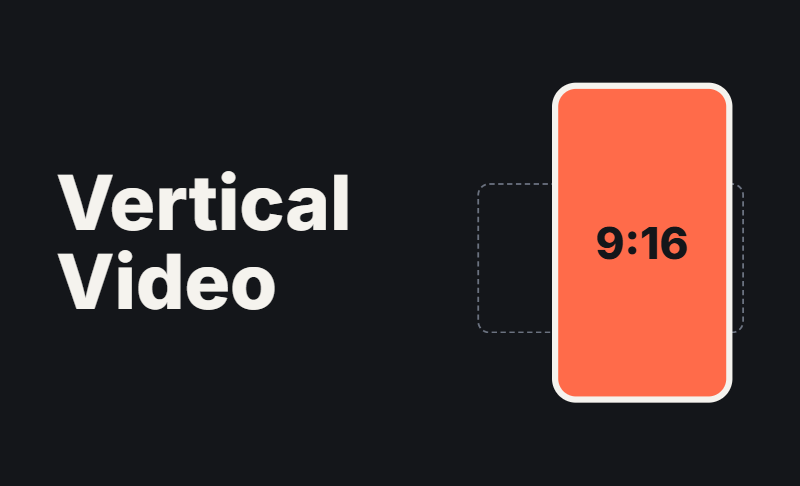
What is vertical video? It's video recorded or formatted in portrait orientation, taller than it is wide, and usually shot at a 9:16 ratio for phones held upright. It's the native format of TikTok, Instagram Reels, and YouTube Shorts.
This guide covers how vertical video differs from horizontal, why it matters, the specs for each platform, and how to shoot or convert it.
Part 1: What Is Vertical Video? (Definition and Aspect Ratio)
Vertical Video Defined
A vertical video has more height than width and fills a phone screen when the phone is held upright. You can shoot it that way from the start, or reframe landscape footage into a portrait frame afterward.
9:16 vertical video is the standard format. The name just describes the frame: for every 9 units of width, there are 16 units of height.
Vertical Video Ratio and Size
The most common vertical video ratio is 9:16, but a few others appear on social feeds. Each has a matching vertical video size (resolution):
| Ratio | Resolution | Best for |
|---|---|---|
| 9:16 | 1080 × 1920 px | Reels, TikTok, Shorts, Stories |
| 4:5 | 1080 × 1350 px | Instagram and Facebook feed posts |
| 3:4 | 1080 × 1440 px | Some feed layouts |
For most projects, 1080 × 1920 is the safest choice. Shooting in 4K gives you extra room to crop and reframe later.
Vertical Video vs Horizontal
Vertical video vs horizontal comes down to where and how people watch.
| Vertical | Horizontal | |
|---|---|---|
| Orientation | Portrait (taller than wide) | Landscape (wider than tall) |
| Common ratio | 9:16 | 16:9 |
| Main devices | Smartphones | TVs, monitors, laptops |
| Viewing style | Quick scrolling, one hand | Lean-back, longer sessions |
| Best for | Social feeds, ads, short clips | YouTube long-form, film, webinars |
Horizontal is still the better choice for long-form YouTube videos, presentations, and cinematic work. If your audience is mostly on phones, vertical usually fits better.
How Vertical Video Went Mainstream
Vertical video was once dismissed as an amateur mistake, known as "vertical video syndrome." That changed as Snapchat, Instagram Stories, and TikTok built their apps around full-screen portrait viewing. YouTube Shorts and Instagram Reels followed. Today most major social platforms treat vertical as the default for short-form content.
Part 2: Why Vertical Video Matters and Where You'll See It
Key Benefits of Vertical Video
- Fills the screen. There are no black bars, so viewers see more of your content.
- Matches natural phone use. Viewers don't have to rotate their phones.
- Helps discovery. Short-form feeds are built around vertical clips, and recommendation algorithms can show them to people who don't follow you yet.
- Works with sound off. Pairing captions with a tight frame keeps viewers watching in public settings.
Vertical Video Platforms and Recommended Specs
Most major vertical video platforms use the same 9:16 frame. Limits differ and change often, so always check each platform's help page before uploading.
| Platform | Ratio | Resolution | Typical length |
|---|---|---|---|
| TikTok | 9:16 | 1080 × 1920 | Up to several minutes |
| Instagram Reels | 9:16 | 1080 × 1920 | Up to 90 seconds or longer |
| YouTube Shorts | 9:16 | 1080 × 1920 | Up to 3 minutes |
| Facebook Reels | 9:16 | 1080 × 1920 | Up to 90 seconds |
| Snapchat | 9:16 | 1080 × 1920 | Short clips, around 60 seconds |
What aspect ratio is YouTube Shorts? It's 9:16, at 1080 × 1920 pixels. The same answer applies if you're asking what ratio is YouTube Shorts. Square (1:1) clips also work, but 9:16 fills the screen best.
Keep titles, captions, and faces away from the top and bottom edges. Platform buttons and text overlays cover those areas.
Vertical Video Examples
These vertical video examples show where the format is used most:
- Short-form social content: tutorials, comedy skits, behind-the-scenes clips, and day-in-the-life videos.
- Social ads: a 15-second product teaser designed for full-screen Stories or Reels placements.
- Ecommerce and product demos: a brand filming a quick before-and-after or unboxing.
- Mobile live streaming: creators going live from a phone or a camera set up to output portrait video.
- News and stories: publishers packaging headlines and quick explainers for phone readers.
Bonus: Keep Your Subject Framed for Vertical Video - OBSBOT Tail Air Streaming Camera
Keeping a moving subject centered is one of the hardest parts of vertical video, especially when you're on camera yourself. The OBSBOT Tail Air is a compact 4K PTZ camera whose AI tracking follows you automatically, and its 4K footage gives you room to crop and reframe to 9:16 later.
Key Features:
- AI Tracking: follows people, animals, or objects so your subject stays in frame without manual adjustment.
- 4K@30FPS / 1080P@60FPS: enough resolution to crop and reframe footage into a 9:16 frame.
- Gesture Control 2.0: start or stop recording and adjust zoom hands-free.
- Low-light performance: an f/1.8 aperture and 2μm pixel size help in dim environments.
- Flexible connections: use it as a USB-C webcam or output through Micro HDMI for live streaming setups.
Part 3: How to Shoot or Convert to Vertical Video
Shooting natively:
- Hold the phone upright, or mount the camera in portrait mode.
- Keep the subject in the center of the frame and move closer than you would for landscape.
- Leave space at the top and bottom for captions and app buttons.
- Use steady lighting and a tripod or stabilizer.
- Record at 1080p or higher. Use 4K if you plan to crop.
Converting from horizontal:
- Use your editor's auto-reframe tool to follow the subject, then correct it manually where needed.
- Don't simply crop the center of a 16:9 clip. You'll often cut off important details.
- Avoid blurred-background padding unless the subject truly can't be reframed.
Editing tips: Put your hook in the first one to three seconds, add captions, and use short shots with quick pacing.
Common Mistakes to Avoid:
- Cropping landscape footage carelessly.
- Putting key text where platform buttons will cover it.
- Treating vertical video as lower quality than horizontal.
- Skipping captions.
- Uploading at the wrong resolution, which leads to extra compression and soft footage.
Part 4: FAQs About What Is Vertical Video
1. What is a vertical video?
It's a video shot or formatted in portrait orientation, taller than it is wide, usually at 9:16. It's designed to fill a phone screen held upright.
2. What is the best aspect ratio for vertical video?
Use 9:16 (1080 × 1920 px) for Reels, TikTok, and Shorts. Use 4:5 (1080 × 1350 px) for feed posts.
3. Is vertical video better than horizontal video?
It depends on where it's viewed. Vertical is better for mobile-first social platforms. Horizontal is better for TVs, desktop viewing, and long-form content.
4. Can I turn a horizontal video into a vertical one?
Yes. Reframe it to 9:16 in a video editor, using auto-reframe or manual keyframes, so the key subject stays in view.
5. What is "vertical video syndrome"?
It's the old problem of accidentally filming upright footage that was meant for landscape playback. It's far less of an issue now that platforms support portrait video.
6. How long should a vertical video be?
Most short-form clips run under 60 seconds, but limits vary by platform and keep changing. Check the platform table above and each platform's help page.
Part 4: Conclusion: What Is Vertical Video and Should You Use It?
So, what is vertical video? It's a portrait-format video, typically 9:16, built for phones and full-screen social feeds. If your audience watches mostly on mobile, vertical is usually the better choice. If they watch on TVs or desktop, or you're making long-form content, horizontal still wins.
To get started, shoot one clip upright at 1080 × 1920, keep the key action in the center, add captions, and publish it to the platform where your audience already is.