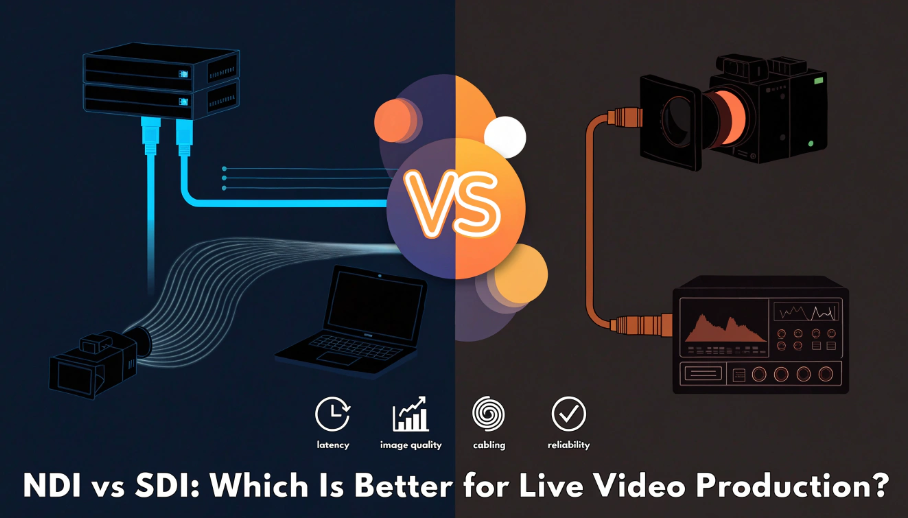
You are planning a live production with cameras near the stage, a switcher at the back of the room, and another screen in the lobby. SDI offers a direct cable from each camera, while NDI promises to move the same sources through the building's network. Which option will be easier to expand, faster on the audience screen, and simpler to fix during a show? This guide compares NDI and SDI through those practical decisions, then shows when each one, or a combination of both, fits the workflow.
NDI vs SDI at a Glance
The main difference between NDI and SDI is how video moves. SDI gives each signal a direct cable path. NDI turns the signal into IP data that compatible cameras, computers, switchers, recorders, and monitors can share over a network.
| Factor | NDI | SDI | What It Means in Practice |
|---|---|---|---|
| Signal path | Shared IP network | Dedicated coaxial cable | NDI is easier to route widely; SDI is easier to trace directly. |
| Routing | Software-based, many-to-many | Point-to-point unless a router or distribution amplifier is added | NDI can send one source to several destinations without repatching cables. |
| Latency | Depends on NDI format, endpoints, and network | Usually lower and more predictable | SDI is the safer default for IMAG and critical focus work. |
| Image transport | Compressed or nearly lossless, depending on format | Uncompressed baseband video | Both can look excellent; the device format matters more than the acronym. |
| Expansion | Add endpoints and network capacity | Add cables, switcher inputs, or SDI routing hardware | NDI scales well across rooms; SDI stays simple in a fixed studio. |
| Troubleshooting | Bandwidth, discovery, switch configuration, or endpoint settings | Cable, connector, format, or device input | SDI faults are often faster to isolate; NDI benefits from network skills. |
| Best fit | Distributed, software-driven, multi-room production | Fixed studios, venues, broadcast trucks, and IMAG | Choose around the workflow, not the newest protocol. |
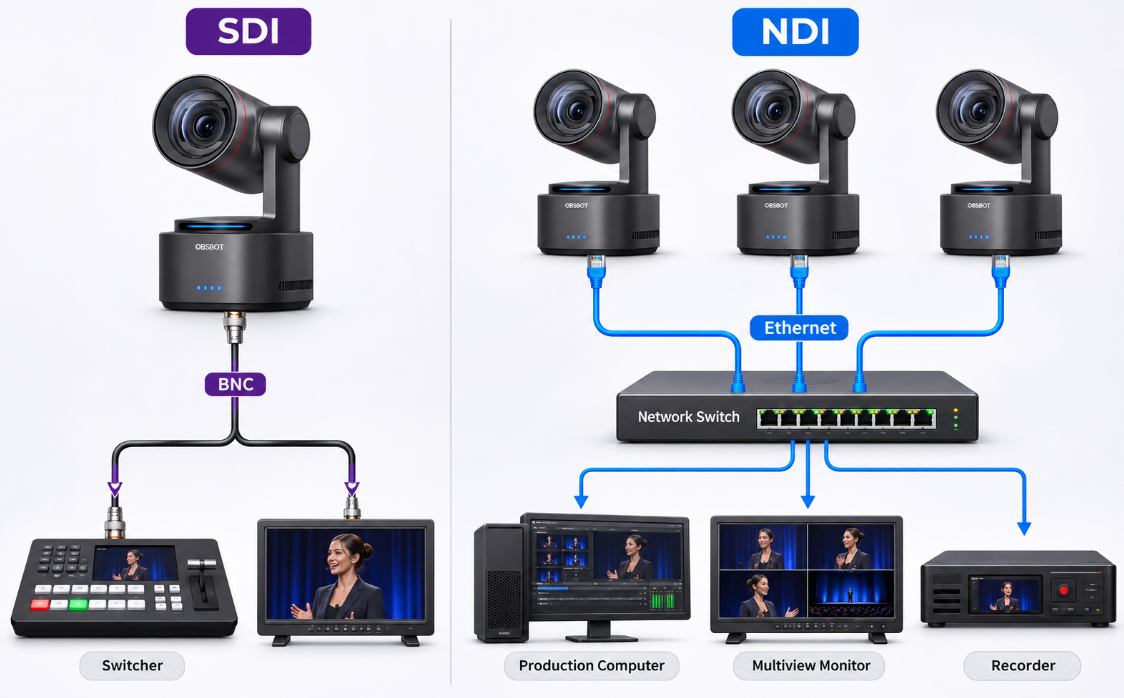
For example: Consider a church with three stage cameras, a switcher in the control booth, and a lobby display.
- With SDI, each camera has a dedicated cable to the switcher; sending video to the lobby requires another output or converter.
- With NDI, the cameras can be available to the production computer and lobby decoder over the network.
The tradeoff becomes operational: a damaged SDI cable normally affects one camera, while an overloaded NDI switch or uplink can affect several feeds at once.
How NDI and SDI Work
What Is NDI?
NDI stands for Network Device Interface. It is an IP video technology that carries video, audio, metadata, and control information over an Ethernet network. An NDI camera can appear as an available source in compatible software without a separate capture card at every destination.
Imagine a church with cameras in the sanctuary, a production computer in another room, and a confidence monitor in the lobby. With a properly designed network, the same NDI source can be available to all three locations. That flexible routing is the main reason teams adopt NDI streaming.
What Is SDI?
SDI stands for Serial Digital Interface. It sends uncompressed digital video, embedded audio, and related data over a coaxial cable with locking BNC connectors. A camera output normally connects directly to a switcher, recorder, monitor, converter, or SDI router.
In a three-camera event setup, each camera can run one labeled SDI cable to a separate switcher input. The operator can see the complete path, replace a suspected cable, and keep the feed separate from the venue's computer network.
NDI vs SDI: The Differences That Change Your Workflow
NDI vs SDI Latency: Is SDI Faster?
SDI is usually faster and more predictable, but the importance of that difference depends on what people can see. If an audience watches a speaker on stage and on a large screen at the same time, even a delay near 100 ms can make lip movement and gestures feel disconnected. SDI is therefore the safer starting point for IMAG, live sports screens, and critical focus pulling.
In a remote classroom, lobby display, recording room, or online stream, a short delay is usually less noticeable because viewers do not compare the screen with the subject directly. NDI can then provide more useful routing flexibility. NDI High Bandwidth sends more data with less compression work, while NDI HX2 and HX3 reduce network use through H.264 or H.265 encoding and add more processing time.
As a planning guide, a complete SDI camera-to-display path commonly falls around 17–50 ms, or roughly one to three frames at 60 fps. A well-configured NDI High Bandwidth path often falls around 17–67 ms, while NDI HX workflows commonly sit around 50–150 ms. NDI's certification limits are under 100 ms for High Bandwidth, 100 ms for HX3, and 150 ms for HX2.
| Signal Type | Where Delay Comes From | What It Means in Practice |
|---|---|---|
| SDI | Camera and downstream device processing | A performer and the venue screen appear closely synchronized. |
| NDI High Bandwidth | Endpoint processing plus network transport | Suitable for low-delay IP production on a capable network. |
| NDI HX3 | H.264/H.265 encoding, network, and decoding | A practical balance for PTZ cameras, streaming, and remote rooms. |
| NDI HX2 | More compressed long-GOP processing | Useful for monitoring and distribution where immediate response matters less. |
Bandwidth and Network Requirements
SDI does not consume network bandwidth. Each feed travels over its own cable. NDI shares network capacity with other NDI feeds and, unless separated, other data traffic.
Official NDI bandwidth guidance lists approximately 130 Mbps for one 1080p60 NDI High Bandwidth stream and around 250 Mbps for 2160p60. Four 1080p60 sources can therefore use about 520 Mbps before adding return feeds, audio, control traffic, or safety headroom. A Gigabit network is the practical minimum for a small High Bandwidth NDI workflow; larger productions should calculate every source and destination before buying switches.
- Use wired Ethernet for primary production feeds. Wi-Fi is useful for preview and mobile monitoring, but congestion and signal changes make it less predictable.
- Keep production traffic controlled. A dedicated switch or properly configured VLAN prevents office downloads and guest traffic from competing with camera feeds.
- Check the whole switch path. Fast camera ports do not help if the uplink between switches becomes the bottleneck.
If you are selecting network cameras, this guide to NDI cameras explains the device-side features that matter.
Image Quality and Video Formats
The image-quality difference matters most when footage contains fine detail, will be color graded, or passes through several encoding stages.
- SDI carries the camera's uncompressed video directly.
- NDI High Bandwidth applies light compression designed to remain visually lossless in production, so it can preserve detail while making network routing possible.
- NDI HX uses stronger compression to lower bandwidth, which is useful when several cameras share a network but can soften fine textures after repeated encoding.
For a lecture, meeting, or talking-head stream, a good NDI HX feed can look very close to SDI for viewers. For an LED-wall production, detailed product shot, or feed that will be graded and encoded again, SDI or NDI High Bandwidth provides more image headroom.
Resolution is a separate decision. The SDI label alone does not mean 4K: 3G-SDI commonly carries up to 1080p60, while 12G-SDI can carry 2160p60. NDI devices can also be HD or 4K. Match the camera output to the receiver, switcher, and final production resolution before choosing the connection.
Cabling, Routing, and Expansion
In a fixed studio, SDI is easy to understand: Camera 1 runs to Input 1, Camera 2 runs to Input 2, and each locking BNC cable has one clear job. Sending Camera 1 to another room requires a loop output, distribution amplifier, or SDI router, but the original connection remains easy to trace.
NDI becomes more useful when the same sources must reach several places. A camera connected to the network can be selected by a production computer, recorder, lobby decoder, or another compatible destination without running a new video cable to each one.
The expansion difference becomes clear when adding another camera. An SDI system needs another cable path and an available hardware input. An NDI system needs a compatible endpoint and enough switch and uplink capacity. SDI expansion is physical; NDI expansion is mainly a network-capacity decision.
Reliability and Troubleshooting
The two systems fail differently. If SDI Camera 2 disappears, the operator can usually inspect that camera, its cable, and Input 2 without disturbing the other feeds. A damaged cable normally removes one source.
NDI shares infrastructure, so a full uplink, incorrect switch setting, or failed network switch can affect several cameras together. The benefit is centralized routing; the cost is a wider troubleshooting path.
- For SDI: Label both ends of every cable, carry tested spares, and confirm the same resolution and frame rate at the camera and switcher.
- For NDI: Reserve device addresses, document switch ports, keep bandwidth headroom, and test with every planned feed running at once.
Which Should You Choose?
Choose the connection that removes the largest operational problem from your production.
Choose SDI When:
- The cameras and switcher stay in fixed positions.
- Audience-facing IMAG needs the most predictable low delay.
- The crew needs a signal path that volunteers can trace quickly.
- The venue network is shared, unmanaged, or outside the production team's control.
- Your existing switcher, router, recorders, and monitors already use SDI.
Typical SDI scenes: A church sanctuary showing the pastor on a large screen, a sports venue feeding a scoreboard, a concert with cameras beside the stage, or a fixed studio where every camera already has a dedicated switcher input.
Choose NDI When:
- Cameras and production computers are spread across several rooms.
- Several software tools or displays need access to the same source.
- The layout changes often and software routing would save setup time.
- Remote PTZ control, video, audio, and PoE need to share one network cable.
- Your team can manage switch capacity, IP addressing, and network troubleshooting.
Typical NDI scenes: A school that shares cameras between classrooms and an auditorium, a corporate campus sending events to meeting rooms, a church with lobby and overflow displays, or a portable production that frequently moves cameras and software stations.
Simple decision: For a fixed three-camera stage with a nearby switcher, start with SDI. For a campus, church, school, or corporate building that needs video in several rooms, NDI can simplify routing. For live events that need both immediate switching and remote distribution, use a hybrid system.
Can You Use NDI and SDI Together?
Yes. NDI and SDI work well in the same production. A venue can use SDI from stage cameras to the main switcher, then convert the program output to NDI for recording, overflow rooms, remote operators, or software-based graphics. A native NDI camera can also feed the network while its SDI output supplies a local hardware switcher.
- Keep latency-critical cameras on SDI for the main program cut.
- Use NDI for remote rooms, software destinations, and flexible source sharing.
- Add SDI-to-NDI or NDI-to-SDI converters where the two systems meet.
- Test format, frame rate, audio, and end-to-end delay at every conversion point.
A Camera That Fits Both Workflows: OBSBOT Tail 2
When one camera needs to move between an SDI switcher and an NDI network, OBSBOT Tail 2 provides both connection paths in a compact PTZR camera. It can serve a fixed production today and move into a networked or hybrid setup later.
- 3G-SDI output connects directly to compatible production switchers and recorders.
- NDI HX3 support brings video into network-based production software with efficient bandwidth use.
- 4K at up to 60 fps supports detailed video and smooth motion through compatible output workflows.
- 5× optical zoom reframes speakers or performers without digital cropping at the optical zoom range.
- AI Tracking 2.0 follows people, animals, or objects when a small crew cannot dedicate an operator to every camera.
Limitation: Tail 2 has no built-in microphone, so a professional production needs an external audio source.
FAQs About NDI vs SDI
Does NDI have more latency than SDI?
Usually. A complete SDI path often falls around 17–50 ms. NDI High Bandwidth commonly falls around 17–67 ms, while NDI HX workflows are often around 50–150 ms. The camera, encoder, switcher, decoder, and display all contribute to the final result.
Do I need a special cable for NDI?
No. NDI uses standard Ethernet cabling and network switches. Cat 6 is a practical choice for new installations. The required switch speed depends on the number, resolution, and NDI format of the feeds.
Can NDI run over Wi-Fi?
NDI can run over Wi-Fi, but wired Ethernet is more predictable for primary production feeds. Use Wi-Fi for mobile previews or low-risk monitoring when a dropped frame will not interrupt the program.
Is NDI image quality better than SDI?
Not automatically. SDI carries uncompressed video. NDI High Bandwidth is visually lossless, while NDI HX uses stronger compression. Camera quality, resolution, bitrate, and the number of encode cycles affect the final image.
Can I convert SDI to NDI?
Yes. An SDI-to-NDI encoder places an SDI camera feed on the network. An NDI-to-SDI decoder converts a network source for an SDI monitor or switcher. Match resolution, frame rate, audio, and NDI format at both ends.
Conclusion
In the SDI vs NDI decision, SDI wins on directness and predictable latency, while NDI wins on routing flexibility and network-based expansion. Choose SDI for fixed, latency-critical production; choose NDI for distributed sources and multiple destinations. If both needs exist, keep the main switching path simple with SDI and use NDI where flexible distribution adds clear value.