4K Webcam with Autofocus: Top 6 Picks

A webcam is one of the most important tools for people who stream or work from home. A 4K webcam with autofocus will be perfect for making you look professional during meetings and classes. It will keep your face in focus, even if you move around in your chair. In addition, the built-in microphones help with clear audio, so let's see the 6 best options. We will also share which features you have to keep in mind to make the best decision.
Part 1: Best 6 4K Webcams with Autofocus
We are reviewing the 6 best options, and all of them promise great video quality. However, all of them have differentiating features and are suitable for different users. So, check and decide which webcam with autofocus and zoom you can choose.
Quick Comparison Table
|
Webcam |
Resolution | Sensor | Focus Type | Price (For reference only) |
|---|---|---|---|---|
|
EMEET SmartCam C60E |
4K@30fps 1080p@60fps |
1/2.8" CMOS | Fast PDAF Autofocus | $69.99 |
|
OBSBOT Tiny 2 |
4K@30fps 1080p@60fps |
1/1.5" CMOS | All-Pixel Auto Focus | $299 |
|
Creative Live! Cam Sync 4K |
4K@25fps 1080p@40fps |
8MP Sony IMX Sensor | Manual Focus | $59.99 |
|
BenQ ideaCam S1 Pro |
4K@30fps | 8MP Sony CMOS | Auto and Manual Focus | $199.99 |
| Elgato Facecam 4K | 4K@60fps 1080p@60fps |
Sony STARVIS 2 1/1.8" CMOS |
Manual or Auto-Adjusting Focus | $199.99 |
| Insta360 Link 2 Pro | 4K@30fps 1080p@60fps |
1/1.3" Sensor |
Phase Detection Auto Focus | $249.99 |
1. eMeet SmartCam C60E

Built for users who need flexibility during video calls and content creation, the EMEET SmartCam C60E has intelligent imaging with practical controls. Its dual-camera system, fast autofocus, hybrid zoom, and customizable lighting make it easy to switch between presentations, streaming, and everyday communication without interrupting your workflow.
Key Features:
- Dual-camera system switches between wide and telephoto views
- 11× hybrid zoom highlights products without moving closer
- Standard 1/4-inch thread supports tripods and custom mounting
- Remote control enables convenient hands-free camera operation
- Three-color RGB lighting creates personalized streaming backgrounds
- EMEET Studio software unlocks advanced camera customization
2. OBSBOT Tiny 2 4K Webcam
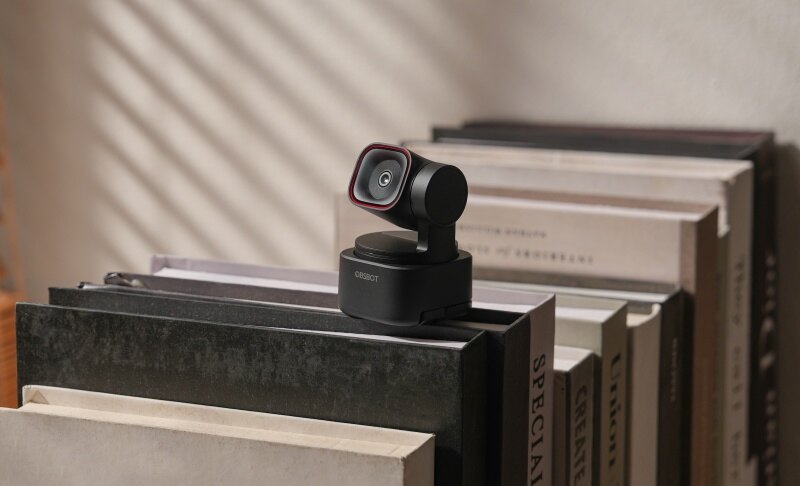
The OBSBOT Tiny 2 is a premium 4K webcam with autofocus designed for video meetings, streaming, and content creation. It comes with AI-powered tracking, fast focusing, and high-quality imaging to deliver a smooth and professional experience. Its smart controls and advanced hardware make it suitable for both everyday users and professionals.
Key Features:
- 4K Video Quality: Records 4K@30fps and 1080p@60fps with PixGain HDR, which promises clear videos and reduces motion blur while preserving details during calls.
- Reliable Autofocus: Uses All-Pixel Auto Focus (APAF) technology on its 50 MP sensor, allowing every pixel to contribute to focusing for sharper video, even when you move.
- Good Low-Light Performance: Has a large 1/1.5-inch CMOS image sensor, which captures more light than smaller webcam sensors for better low-light performance.
- Dual Noise-Reducing Mics: Includes dual omnidirectional microphones with built-in noise reduction to capture clearer voice audio while minimizing background noise.
- Instant Camera Enhancement: Built-in Beauty Mode that automatically smooths skin and brightens the eyes with a single click for a polished appearance.
3. Creative Live! Cam Sync 4K

A good webcam should adapt to different workspaces without making setup complicated. Creative Live! Cam Sync 4K is built with that goal in mind, balancing everyday usability with dependable performance for meetings, livestreams, and online collaboration. This 4K webcam for streaming has a practical design, which makes it suitable for both first-time buyers and experienced creators.
Key Features:
- Backlight Compensation offers adjustable exposure across changing lighting conditions
- Manual focus ring provides precise control for close-up subjects
- Voice Detect automatically activates microphones only while speaking
- Noise Clean-out filters outgoing background audio using software processing
- Adjustable pan-and-tilt mechanism simplifies accurate camera positioning
- Physical privacy cover blocks the lens between sessions
4. BenQ ideaCam S1 Pro

Switching between face-to-face presentations and close-up demonstrations becomes much simpler with BenQ ideaCam S1 Pro. Designed to handle both tasks in one device, this 4K autofocus webcam helps educators, designers, and professionals present ideas more naturally while reducing the need for multiple cameras or complicated desk setups.
Key Features:
- Auto-rotation instantly adapts between portrait and desk orientations
- 15x magnifying lens reveals intricate object details precisely
- AI noise cancellation improves voice clarity in shared workspaces
- One-touch Freeze function captures content without interrupting presentations
- Universal tripod mount supports flexible document camera positioning
- Dedicated hardware buttons provide quick access to essential controls
5. Elgato Facecam 4K

Elgato brings its streaming expertise to the Facecam 4K, creating a webcam that feels closer to a dedicated camera than a typical USB model. Instead of relying on AI tricks, this webcam with autofocus prioritizes creator-focused tools, giving users greater control over how every recording or livestream ultimately looks.
Key Features:
- 49mm filter mount supports professional optical accessories.
- Dynamic Range adjustment balances highlights and shadow detail
- Cinematic LUT support creates customized color grading profiles
- Background Blur applies software-based depth effects without hardware
- Stream Deck integration enables instant camera setting automation
- Fixed-focus optics maximize sharpness within the optimal focus zone
6. Insta360 Link 2 Pro

The line between webcams and dedicated cameras continues to shrink as imaging technology becomes more advanced. Users now expect professional-looking video without investing in bulky equipment or complicated setups. Insta360 Link 2 Pro answers those expectations with a premium design built for modern content creation and communication, as it's the best autofocus webcam.
Key Features:
- Dual Native ISO balances exposure across changing light
- Natural Bokeh creates realistic DSLR-style background separation
- Two-axis gimbal enables smooth AI-powered motion tracking
- Four audio modes adapt voice pickup to environments
- Stream Deck integration automates camera controls during broadcasts
- Scene Presets recall customized framing and imaging instantly
Part 2: Key Features to Look For in a 4K Webcam with Autofocus
The best 4K webcam with autofocus offers more than just high resolution. Features like fast autofocus, HDR, smooth frame rates, good microphones, and AI tools all improve your video quality.
1. Fast and Reliable Autofocus
Autofocus keeps your face sharp without needing manual adjustments. If you move closer to explain something during a Zoom meeting or step back while teaching, the camera quickly refocuses to maintain a clear image. Many premium webcams use AI-powered autofocus or Phase Detection Autofocus (PDAF), which locks onto your face faster and reduces blurry moments.
2. True 4K Resolution
A 4K autofocus webcam records at 3840 × 2160 pixels, delivering four times the detail of a Full HD webcam. The extra resolution makes facial features, text, and products appear much clearer. For example, if you're showing a document during an online meeting or reviewing a product on YouTube, viewers can easily see small details. Even if streaming platforms reduce the resolution, starting with 4K often produces a sharper final image.
3. HDR and Low-Light Performance
Lighting can greatly affect video quality. HDR (High Dynamic Range) helps balance bright and dark areas, so your face stays visible even if there's a bright window behind you. Low-light performance is equally important. Webcams with larger image sensors and advanced image processing produce brighter, cleaner video in dim rooms. This makes a noticeable difference if you often work at night or attend meetings in spaces with limited lighting.
4. Frame Rate for Smooth Video
Frame rate, measured in frames per second (FPS), affects how smooth your video looks. Most webcams record at 30 FPS, which is ideal for video calls and online classes. Higher-end models support 60 FPS, creating smoother movement during gaming, live streaming, or fitness sessions. If you mostly attend meetings, 30 FPS is enough. However, content creators and streamers will appreciate the extra fluidity that 60 FPS provides.
5. Microphone Quality
Clear audio is just as important as sharp video. Many webcams with autofocus include dual microphones with noise reduction to reduce sounds like keyboard typing, fans, or traffic outside. For everyday meetings and online classes, built-in microphones work well. If you create professional videos or podcasts, pairing your webcam with a separate USB microphone can deliver even better sound quality.
Part 3: FAQs About 4K Webcam with Autofocus
1. Is a 4K webcam better than a 1080p webcam?
Yes, a 4K webcam captures much more detail, making your image sharper. It also allows better digital zoom without losing as much image quality.
2. Does autofocus improve video calls?
Yes, autofocus keeps your face sharp as you move, reducing blurry video during meetings, online classes, and presentations. However, your internet quality should be top-notch.
3. Which is the best autofocus webcam for streaming?
The OBSBOT Tiny 2 and Elgato Facecam 4K are popular choices because they have excellent autofocus, high-quality video, and streaming-friendly features.
4. Can I use a 4K webcam with Zoom?
Yes, Zoom supports 4K webcams, although the final video quality depends on your internet connection, account settings, and Zoom's supported resolution.
5. Do all 4K webcams work with Windows and Mac?
Yes, most modern 4K webcams support both Windows and macOS through standard USB connections. Always check the manufacturer's compatibility list before buying.
Conclusion
Choosing the right 4K webcam with autofocus depends on how you plan to use it. Some models are built for professional meetings, while others shine during gaming, streaming, or teaching. Compare image quality, focusing performance, lighting support, microphones, and software features before making your decision. A reliable webcam can improve communication, create more polished videos, and save time by adjusting focus automatically. By matching the camera's strengths with your everyday tasks, you can enjoy clearer, more dependable video for years to come.